
Visual Anchors and Cognitive Supports for Classroom Management
Visual anchors and cognitive supports are the “permanent instructions” of a well-managed classroom. By externalizing expectations through anchor charts, visual schedules, and checklists, teachers reduce the cognitive load on students. These tools move the responsibility of “remembering what to do” from the student’s brain to the classroom walls, fostering independence and reducing the need for constant verbal redirection.
This is Lesson 5 of Module 4: Classroom Environment and Management | Full Course Outline
Mindset Shift: Reminding vs. Supporting
| The Verbal Lens (Reminding) | The Visual Lens (Supporting) |
| Action: Repeating instructions multiple times. | Action: Pointing to a visual anchor or checklist. |
| Student Brain: Must hold steps in working memory. | Student Brain: Can “offload” steps to the environment. |
| Teacher Role: The constant “human reminder.” | Teacher Role: The facilitator of student independence. |
| Result: Teacher fatigue; student dependency. | Result: Classroom flow; student self-regulation. |
| Feel: Frustrating and repetitive. | Feel: Calm and automated. |
If you’ve ever repeated the same instruction three times and still watched students freeze, wander, or ask, “What are we doing?”—this module is for you.
Classroom management isn’t just about expectations or relationships. It’s also about cognitive load.
Visual anchors and cognitive supports reduce the mental effort required just to function in a classroom. When students don’t have to hold everything in their head, they regulate better, transition faster, and rely less on you as the reminder machine.
This isn’t about decorating your walls.
It’s about offloading thinking so students can focus on learning.
What Are Visual Anchors (and What They Aren’t)
Visual anchors are stable, predictable visuals that help students answer common classroom questions without asking you.
They answer things like:
What am I supposed to be doing right now?
What does “on task” look like?
What happens next?
How do I fix this when I’m stuck?
Visual anchors are not:
Busy posters students never look at
Pinterest-perfect walls with no function
Rules lists written once and forgotten
They are working tools, not decorations.
The Science: How Visual Anchors Improve Behavior
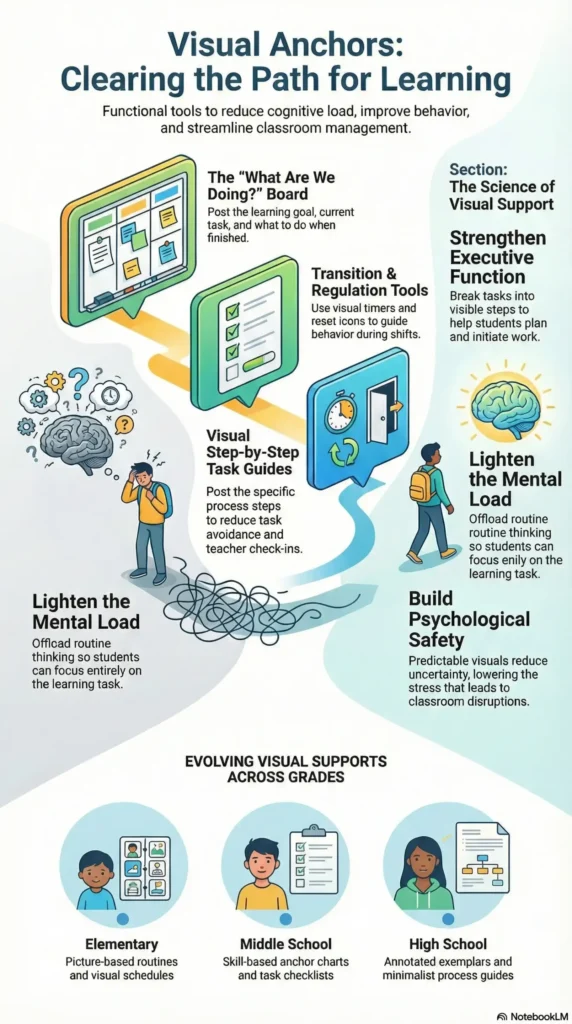
1. They Reduce Cognitive Load
Students are constantly managing:
Instructions
Social expectations
Emotional regulation
Task demands
When expectations live only in your voice, students must:
Listen
Remember
Translate
Apply
Visuals reduce that burden by making expectations external and stable.
Less cognitive load = more capacity for self-regulation.
2. They Support Executive Function
Executive function skills—like planning, task initiation, and impulse control—are still developing (especially in adolescents).
Visual supports help by:
Breaking tasks into visible steps
Making time and sequence concrete
Reducing reliance on working memory
This is support, not lowering standards.
3. Visual Anchors Lower Stress and Threat Response
Uncertainty activates stress.
When students don’t know:
What’s happening
How long something will take
What “done” looks like
Their nervous system fills in the gaps—often with avoidance or disruption.
Predictable visuals = psychological safety.
High-Impact Visual Anchors Teachers Can Use Tomorrow
1. The “What Are We Doing?” Board
Post three things only:
What we’re learning
What we’re doing
What to do when finished
This helps:
Late arrivals
Absent-minded moments
Students who hesitate to ask
Tip: Keep wording consistent every day.
2. Visual Expectations (Show, Don’t Tell)
Instead of saying “work quietly,” show:
A simple icon
A short checklist
A photo example (especially helpful in elementary)
Students regulate better when expectations are concrete.
3. Step-by-Step Task Anchors
Post the process, not just the outcome:
Read the prompt
Highlight key words
Start with sentence one
This reduces:
Task avoidance
“I don’t know where to start” behavior
Constant teacher check-ins
4. Transition Visual Anchors
Transitions are where management often falls apart.
Use:
A visual timer
A countdown slide
A consistent symbol for “wrap up”
Predictability reduces chaos.
5. Emotion and Regulation Supports
A simple visual that shows:
What to do when frustrated
How to ask for help
Where to pause and reset
This helps students regulate before behavior escalates.
Cognitive Supports That Work Across Grades
Elementary
Picture-based routines
Visual schedules
Emotion charts with action steps
Middle School
Checklists
Anchor charts tied to specific skills
Clear “start here” visuals
High School
Process guides
Exemplars with annotations
Minimalist visuals focused on independence
Same principle. Different packaging.
A Common Mistake: Too Many Visual Anchors
More visuals ≠ more support.
Too many visuals:
Compete for attention
Increase cognitive noise
Become wallpaper
Rule of thumb:
If students don’t actively use it, remove it.
How to Introduce Visual Anchors
Visuals don’t work unless they are taught.
To introduce a visual anchor:
Explain what it’s for
Model using it
Practice with students
Refer to it consistently
Otherwise, it’s just a poster.
Try This Tomorrow (Low Effort, High Impact)
Create one visual that answers one recurring classroom question.
Not ten.
Not a whole wall.
Just one.
Teach it.
Use it.
Let it do the work.
Visual Anchors FAQ
What are visual anchors in a classroom? Visual anchors are permanent or semi-permanent displays—such as anchor charts, posters, or checklists—that remind students of classroom procedures, academic strategies, or behavioral expectations. They serve as a ‘cognitive prosthetic’ that helps students stay on task without needing verbal teacher support.
How do visual supports help students with ADHD and executive functioning issues? Students with ADHD or executive functioning challenges often struggle with working memory. Visual supports ‘externalize’ time and tasks, providing a concrete reference point that reduces the mental effort required to stay organized and follow multi-step directions.
What is the difference between an anchor chart and classroom decor? Classroom decor is primarily aesthetic. An anchor chart is a functional tool co-created with or explicitly taught to students. For an anchor chart to be effective, it must be relevant to current learning, easy to read from a distance, and used actively during instruction.
Reflection
I used to rely on verbal reminders and repeated directions, assuming students would remember what to do from one activity to the next. I eventually realized how much time I was spending re-explaining routines that could have been supported visually instead. Once I started adding simple visual schedules, anchor charts, and procedure reminders around the room, students became more independent and I was able to focus more on teaching instead of repeating instructions.
What questions do students ask me repeatedly?
Where do transitions break down?
What expectations do I explain over and over?
Continue the Classroom Management Course
In the next module, we will explore how proactive classroom management strategies prevent disruptions before they occur and create a structured learning environment where students stay engaged.
Next Module: Proactive Classroom Management Strategies That Prevent Disruption
Module 4 Progress:
Back to Module 4 Overview
Return to Full Course Outline