
6 AI Tools for Special Education Teachers That Save Time
Special education teachers juggle more documentation, differentiation, and individualized planning than almost anyone else in a school building. Between writing and updating IEPs, tracking accommodations, and creating materials that meet each student’s needs, the administrative load alone can eat up hours that would be better spent with students. That’s exactly where AI tools for special education teachers come in, not to replace your expertise, but to handle the repetitive work faster.
At The Cautiously Optimistic Teacher, we’ve been exploring how AI can make teachers’ lives easier without adding another complicated system to learn. We build and recommend tools that actually fit into a real educator’s workflow, like our own Differentiated Instructor and Report Card Assistant. So when it comes to special ed, we wanted to find options that genuinely save time on the tasks that drain it most.
Below, you’ll find six AI tools worth trying, each one chosen because it tackles a specific pain point special education teachers face, from IEP drafting to creating accessible learning materials. No fluff, no tools that sound impressive but don’t deliver. Just practical picks that earn their place in your routine.
1. The Cautiously Optimistic Teacher AI Tools
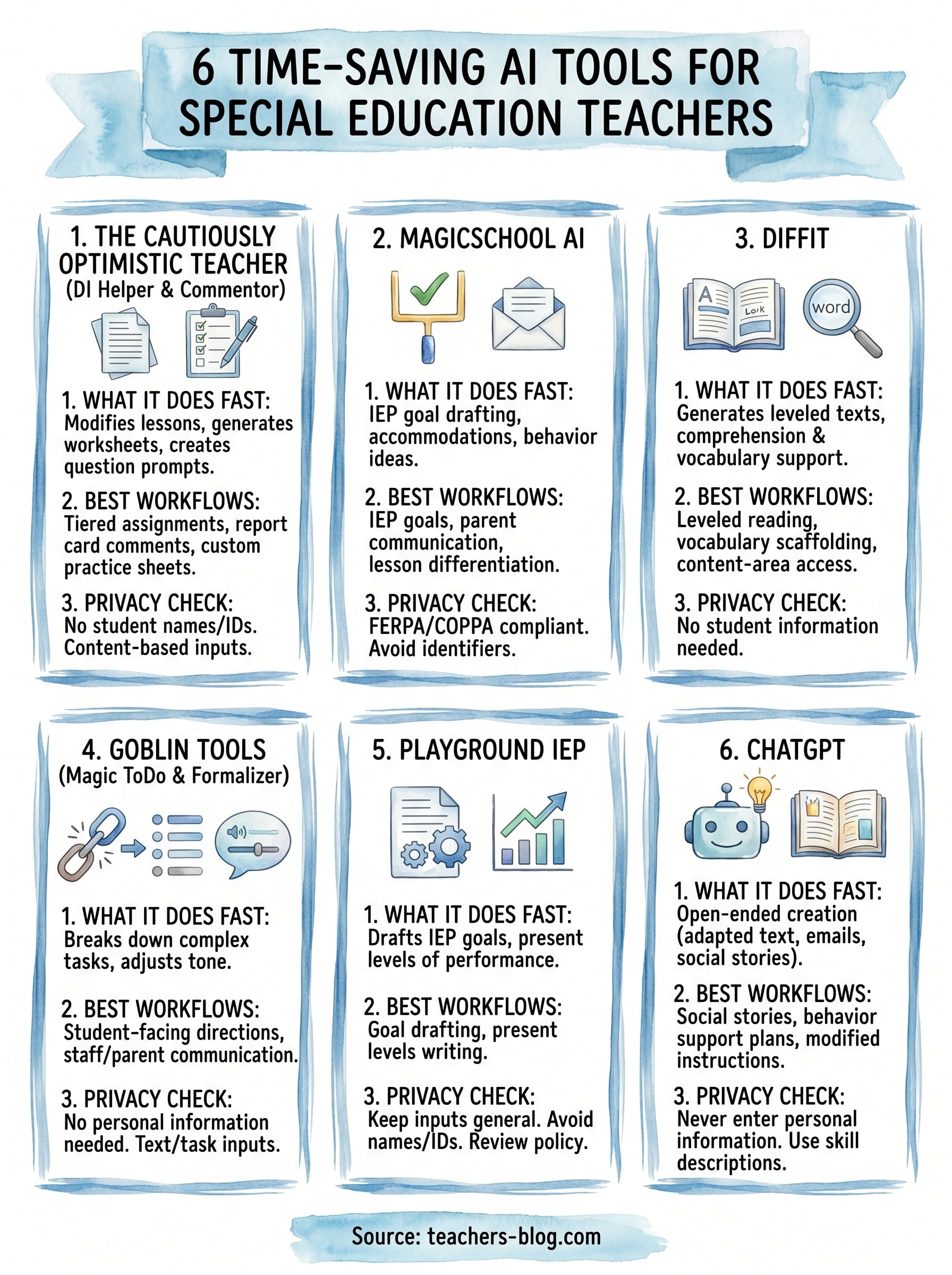
The Cautiously Optimistic Teacher built its AI tools specifically for educators who need practical, classroom-ready solutions without a steep learning curve. These tools are available through a simple web interface, with each assistant focused on a specific classroom task. For special education teachers especially, the Differentiated Instructor and Report Card Assistant cut down the time you spend on two of the most exhausting recurring tasks.
What it helps you do fast
Using the Differentiated Instructor, you paste in a lesson or concept and instantly receive modified versions tailored to different learning levels. You can also use the Worksheet Generator to generate customized practice materials from keywords, and the Question Generator to build critical thinking prompts from any text you provide. These tools handle the repetitive production work so you can focus your energy on decisions that actually require your professional judgment.
If you’re regularly building three or four versions of the same worksheet, the Worksheet Generator alone can recover a full prep period each week.
Best special education workflows to use it for
Special education teachers get the most value from these tools when they apply them to differentiated material creation and report card writing. Here are the workflows that fit most naturally:
- Tiered assignments: Use the Differentiated Instructor to generate modified versions of a core lesson at multiple reading and complexity levels
- Report card comments: Use the Report Card Assistant to draft individualized comments you then edit, rather than writing from scratch
- Custom practice sheets: Use the Worksheet Generator to quickly produce targeted skill-building materials
Privacy and student data checklist
You do not need to enter any student names or identifying information to use these tools. Inputs are content-based, meaning you describe a skill, topic, or learning goal rather than a specific child. That approach keeps your use of these AI tools for special education teachers within responsible data practice without requiring extra steps on your part.
- No student names required
- No account login or data stored in a user profile
- Content inputs only, never personal identifiers
Pricing and plan notes
The current educational AI assistants on The Cautiously Optimistic Teacher are free to access through the site. Teachers should still follow school or board privacy requirements and avoid entering personally identifiable or sensitive student information unless that use is explicitly approved.
2. MagicSchool AI
MagicSchool AI is one of the most widely used AI tools for special education teachers, with over 60 educator-specific tools inside one platform. It was built for teachers, so you spend less time figuring out how to prompt and more time using the output.
What it helps you do fast
MagicSchool AI speeds up IEP goal drafting, accommodation planning, and behavior intervention ideas. You enter a student’s needs or subject area and get a ready-to-edit draft in seconds.
Spending more than 20 minutes on a single IEP goal is common. MagicSchool AI can cut that time down substantially.
Best special education workflows to use it for
The platform includes tools built around special education documentation and family communication. The most useful options for special ed teachers include:
- IEP goal writing: Generate measurable goals by entering the skill area and baseline data
- Parent communication: Draft clear, accessible letters and progress updates
- Lesson differentiation: Adapt content for multiple ability levels quickly
Privacy and student data checklist
MagicSchool AI is FERPA and COPPA compliant, which matters when you work with student information. The platform recommends you avoid entering personally identifiable student data directly into any prompt.
- Compliant with FERPA and COPPA
- Avoid student names and identifying details in prompts
Pricing and plan notes
MagicSchool AI provides a free plan with access to its core tools. A paid Pro tier unlocks higher usage limits and additional features for teachers who use it daily.
3. Diffit
Diffit is a reading differentiation tool that generates leveled texts from any topic, URL, or article. It’s especially useful for special education teachers who need multiple reading versions of the same content without spending hours rewriting everything manually.
What it helps you do fast
Diffit creates adapted reading passages at different Lexile levels within seconds. You enter a topic or paste in a source text, and it produces a simplified version with comprehension questions and vocabulary support already built in.
If you support students reading several grade levels below their peers, Diffit can produce an accessible version of grade-level content in under a minute.
Best special education workflows to use it for
This tool fits naturally into workflows where ai tools for special education teachers need to close the gap between grade-level content and student reading ability. Strong use cases include:
- Leveled reading materials: Generate the same passage at two or three different reading levels
- Vocabulary scaffolding: Key term support is included automatically in output
- Content-area access: Adapt science or social studies texts for students with reading disabilities
Privacy and student data checklist
Diffit does not require you to enter any student information to generate materials. You work with topics and texts only, which keeps your use clean from a data privacy standpoint.
- No student names or IDs needed
- Topic and text-based inputs only
Pricing and plan notes
Diffit offers a free plan that covers basic differentiation features. A paid tier unlocks higher generation limits and additional export options for teachers who use it regularly.
4. Goblin Tools
Goblin Tools is a free collection of small, focused AI utilities built to help neurodivergent users manage complex tasks by breaking them into clear, sequential steps. For special education teachers, it’s useful both as a personal productivity tool and as a resource you can use to model task-breakdown strategies for your students.
What it helps you do fast
The standout feature is Magic ToDo, which takes any large task and automatically splits it into smaller, ordered steps. You can also use the Formalizer to adjust the tone of written communication and the Judge tool to flag whether instructions might read as unclear or ambiguous before you hand them to students.
If your students struggle with multi-step directions, Magic ToDo can help you rewrite those directions in a format they can actually follow on their own.
Best special education workflows to use it for
Goblin Tools fits naturally into workflows where task clarity and executive function support are the priority. The most practical applications include:
- Student-facing directions: Break complex assignments into sequenced, bite-sized steps
- Staff and parent communication: Use the Formalizer to adjust tone quickly without rewriting from scratch
Privacy and student data checklist
You do not need to enter any student names or personal information to use Goblin Tools. All inputs are task or text-based, which keeps your use of ai tools for special education teachers clean from a data privacy standpoint.
- No student identifiers required
- Text and task-based inputs only
Pricing and plan notes
Goblin Tools is completely free to access with no account creation required. Everything runs through the web browser with no subscription tier or usage cap.
5. Playground IEP
Playground IEP is built specifically for one of the most time-intensive parts of special education work: writing IEPs. Unlike general-purpose ai tools for special education teachers, Playground IEP focuses entirely on the IEP process, which means every feature inside it exists to speed up documentation without cutting corners on quality.
What it helps you do fast
This tool generates draft IEP goals and present levels of performance based on the information you enter about a student’s needs. You describe the skill area and current performance, and it returns a structured, editable draft in seconds rather than asking you to build one from a blank page.
Writing a full set of measurable IEP goals from scratch can take an hour or more; Playground IEP reduces that to a few minutes of editing.
Best special education workflows to use it for
Playground IEP fits best into IEP writing and annual review prep. The most practical applications include:
- Goal drafting: Generate measurable, standards-aligned goals by entering a skill area
- Present levels writing: Produce structured present level statements ready to edit and finalize
Privacy and student data checklist
Keep inputs general and non-identifying when describing student needs. Always review their current privacy policy before entering any information connected to a specific child.
- Avoid entering student names or IDs
- Review the platform’s data policy before first use
Pricing and plan notes
Playground IEP offers a free tier for basic IEP drafting. Paid plans unlock additional tools and higher usage limits for teachers managing larger caseloads.
6. ChatGPT
ChatGPT is the most flexible of all ai tools for special education teachers because it has no fixed structure. You bring the prompt, and it produces whatever you need, from adapted lesson text to draft parent emails, all within the same conversation.
What it helps you do fast
ChatGPT speeds up open-ended content creation across a wide range of tasks. Ask it to simplify a passage, generate a rubric, write a social story, or outline behavior strategies, and you get a usable draft in seconds.
The more specific your prompt, the better the output; include the grade level, skill area, and learning goal to get something you can actually edit and use.
Best special education workflows to use it for
ChatGPT handles documentation and instructional tasks without requiring a specialized platform. Strong use cases include:
- Social stories: Generate scenario-based narratives for students working on social skills
- Behavior support plans: Draft initial language you refine with your own observations
- Modified instructions: Rewrite complex directions at a lower reading level
Privacy and student data checklist
Never enter student names, IDs, or any personally identifiable information into ChatGPT. Keep every prompt general and treat it as a public input at all times.
- No student identifiers in prompts
- Use skill and need descriptions only, never names
Pricing and plan notes
ChatGPT offers a free tier through OpenAI that covers the core model. A paid Plus plan unlocks faster responses and access to more advanced models for teachers who use it heavily.
- Free: Core model, standard response speed
- Plus: $20/month, faster responses, advanced model access
Pick one tool and try it this week
The best way to find out which ai tools for special education teachers actually fit your workflow is to pick one and use it this week, on a real task. Match the tool to your biggest current time drain: if IEP goals are eating your evenings, start with Playground IEP or MagicSchool AI. If you spend hours creating differentiated materials, start with Diffit or the Differentiated Instructor.
You don’t need to adopt all six at once. Testing one tool on an actual task gives you a clearer picture than reading about it ever will. Use it for a single workflow, evaluate the output honestly, and let that experience guide your next step. Small, focused experiments are how most teachers find tools that genuinely stick.
For more practical tools and teaching strategies built specifically for educators, explore The Cautiously Optimistic Teacher and find what saves you the most time starting today.