
11 Best AI Tools for Math Teachers (Free and Paid)
You’ve got 32 kids at 32 different math levels, a stack of quizzes to grade tonight, and about zero extra hours in the week. AI for math teachers isn’t a gimmick anymore, it’s the difference between drowning in grading and actually getting home for dinner. If you’ve spent any time searching for help, you already know the tool list out there is messy and half of it doesn’t even work for equations, graphs, or step-by-step problem solving.
This list fixes that. We tested and vetted math ai tools for teachers that actually handle the stuff generic AI chatbots botch, like rendering fractions correctly, generating aligned practice problems, and grading work that shows steps instead of just a final answer.
Below you’ll find 11 picks covering everything from quiz generation to personalized practice, with clear notes on pricing so you know exactly which are free ai tools for math teachers and which paid options are worth the subscription. Whether you teach algebra, geometry, or calculus, you’ll walk away with tools you can use in your lesson plan this week.
1. The Cautiously Optimistic Teacher’s AI toolkit for math class
We built our own suite of AI tools because we kept hitting the same wall other math teachers hit: generic AI chatbots don’t understand differentiation, worksheet formatting, or the specific language you need for report cards. The AI toolkit for math class on The Cautiously Optimistic Teacher offers a growing collection of free tools that handle the grind work most math teachers do every single week, so you can spend more time actually teaching and less time formatting problem sets at 9pm.
How it works
Each tool in the toolkit does one job well instead of trying to be everything at once. The Differentiated Instruction Helper takes a lesson or standard you’re already teaching and rewrites it into tiered versions for struggling, on-level, and advanced students, which matters a lot in a math classroom where the gap between kids can be two or three grade levels wide, so it pairs well with proven ways to differentiate math instruction. The AI worksheet maker generates a full practice set from just a few keywords, like "two-step equations" or "volume of cylinders," and formats it so you can print it straight away. The Leveled Text Creator and Writing Feedback Generator can support reading access and feedback tasks when those needs come up in math class. The Report Card Assistant can draft comments from the non-identifying performance details you provide; review and personalize every comment before using it.
The real value of these tools isn’t novelty, it’s giving back the hours you’d normally spend on repetitive prep so you can focus on actual instruction.
Who it’s for
This toolkit suits math teachers who are already stretched thin on planning time and need something that fits directly into a standards-based classroom, not a generic AI assistant that requires heavy prompting to get useful output. It works especially well for teachers managing mixed-ability classes, where differentiation isn’t optional but rarely gets the time it deserves. Middle and high school math teachers will find the most direct use here, though the differentiation and worksheet tools scale down for upper elementary math just as easily.
Middle school and high school teachers juggling multiple preps will get the most mileage, since each tool takes a task that normally eats into evenings and compresses it into minutes.
Pricing
Every tool in the toolkit is free ai tools for math teachers territory. The current educational AI assistants are available free through The Cautiously Optimistic Teacher. You can sign up for the weekly newsletter if you want new tools and resources delivered automatically, but that’s optional and separate from using the AI tools themselves. For a teacher testing whether AI belongs in their workflow at all, this is the lowest-risk place to start.
2. Khanmigo for personalized math tutoring
Khan Academy built Khanmigo as personalized learning technology that acts like a patient tutor who never runs out of time for one more question, and for math specifically, that means a student can work through a problem at 10pm and get real-time guidance instead of just a final answer. Unlike a generic chatbot, Khanmigo is trained to use the Socratic method, so instead of handing over the solution, it nudges students toward the next step with a question of its own.
How it works
Students type in a problem or paste one from their Khan Academy assignment, and Khanmigo walks them through it step by step, checking their reasoning along the way instead of just verifying the final number. Teachers get a companion dashboard that shows where a class is stuck, which is useful when you’re trying to figure out if half your students are struggling with the same concept before you re-teach it. Because it’s built directly into Khan Academy’s existing math curriculum, it lines up with lessons you might already be assigning.
A tutor that asks the next question instead of giving the answer teaches more than one that just solves the problem for you.
Who it’s for
Khanmigo suits teachers already using Khan Academy for math practice, since the tool integrates directly with that content rather than working as a standalone chatbot, and it helps to know how to set up Khan Academy for your class first. It’s a strong fit for classrooms doing blended learning, where students split time between direct instruction and independent practice.
Pricing
Khanmigo runs on a subscription model, though many districts get access through Khan Academy’s institutional partnerships at reduced or no cost to individual teachers. Check with your district office before assuming you need to pay out of pocket, since school-wide licenses are common.
3. MagicSchool AI for lesson planning and quizzes
MagicSchool AI built its reputation as a general teaching assistant, but its math-specific tools have caught up fast, especially for quiz generation and using AI for lesson planning across a unit. It’s one of the more popular ai tools for math teachers because it covers the whole planning cycle instead of just one task, from writing objectives to generating an assessment aligned to them.
How it works
You start by picking a tool from MagicSchool’s library, like the Multiple Choice Assessment Generator or the Unit Plan tool, then feed it a topic, grade level, and standard. The platform pulls together a draft in seconds, whether that’s a full lesson sequence on solving systems of equations or a ten-question quiz on proportional relationships. Teachers can regenerate any section that misses the mark, which matters because math questions sometimes come back with awkward number choices or unclear phrasing on the first pass.
A quiz generator only saves you time if you can trust the numbers it spits out, so always run a quick check before printing.
Who it’s for
MagicSchool suits teachers who plan across multiple subjects and want one platform instead of five separate apps for lesson plans, quizzes, rubrics, and parent emails. It’s a solid match for new teachers still building out their first year of math curriculum, since the templates cut down the blank-page problem that eats up so many planning periods.
Pricing
MagicSchool offers a free tier that covers most of the core tools, including quiz and lesson plan generation, making it a legitimate option among free ai tools for math teachers. The paid tier unlocks higher usage limits and additional tools, running on a per-teacher subscription that many districts now purchase in bulk.
4. Photomath for step-by-step problem solving
Photomath started as a homework app that scans a printed or handwritten problem and shows the full solution path, and it’s become one of the most downloaded math ai tools for teachers to recommend to students who need extra practice outside class. Instead of just spitting out an answer, it breaks down each step the way a tutor would explain it on a whiteboard, which is exactly what a student stuck on a worksheet at home actually needs.
How it works
A student points their phone camera at a problem, whether it’s printed in a textbook or scribbled on notebook paper, and Photomath reads it and generates a step-by-step breakdown. It covers everything from basic arithmetic through calculus, including word problems, graphs, and word-based systems of equations. The app also offers multiple solving methods for the same problem in algebra, which helps when a student’s textbook teaches a different approach than the one they’re used to.
A step-by-step solver only helps a student learn if they read the steps instead of just copying the final answer.
Who it’s for
Photomath fits best as a resource you point students toward rather than something you use yourself for lesson prep. It works well for students doing homework independently, for parents trying to help with math they haven’t touched in twenty years, and for tutoring programs that want a consistent way to model solution steps. Teachers assigning independent practice can lean on it as a built-in check, letting students verify their own work before turning something in.
Pricing
Photomath’s core scanning and step-by-step feature is free, covering most of what a typical middle or high school student needs. A paid subscription unlocks extra explanation depth and animated walkthroughs for trickier concepts, but for classroom purposes, the free version does the heavy lifting without costing your students or their families anything.
5. Wolfram Alpha for advanced computation and graphing
Wolfram Alpha built its name on being a computational engine long before "AI" became the buzzword everyone slapped on their product, and it still handles math that trips up most chatbots, including multivariable calculus, matrix operations, and differential equations. For ai tools for math teachers working with upper-level classes, this is the one that actually gets the harder content right instead of guessing at a plausible-looking answer.
How it works
You type in an equation, function, or even a word problem, and Wolfram Alpha returns not just an answer but a full computational breakdown, including graphs, alternate forms, domain and range, and step-by-step solutions when you enable that option. Teachers building a precalculus or calculus unit can pull a graph of a function family in seconds instead of sketching it by hand on the board. It also handles statistics, linear algebra, and number theory, which makes it useful well past algebra one.
A tool built for computation first will always beat a general chatbot on the math that actually matters in an advanced class.
Who it’s for
Wolfram Alpha suits high school teachers covering advanced math, think precalculus, calculus, statistics, and honors-level algebra, where the computation itself is complex enough that a general AI assistant starts making arithmetic errors. It’s also a strong fit for students prepping for the SAT or ACT math sections who need quick verification on harder problem types.
Pricing
The basic web version is free and covers most classroom needs, including graphing and step-by-step solutions for a limited number of queries per day. Wolfram Alpha Pro adds unlimited step-by-step solutions, extended computation time, and downloadable results, running on an annual subscription that’s worth it if you or your students hit the free daily limit regularly.
6. Mathway for fast homework help
Mathway built its reputation on speed. Type in a problem or snap a photo, and you get an answer back in seconds, no ads to click through, no sign-up wall blocking the solution. It’s become a go-to among best free ai tools for math teachers recommend to students who just need a quick check on a homework problem before class starts.
How it works
Open the app or website, select the math category (basic math, algebra, trigonometry, calculus, and more), and either type the problem or scan it with your camera. Mathway returns the answer almost instantly, and a paid tier unlocks the full step-by-step breakdown showing how it got there. The category selector matters here since picking the right one, say, calculus instead of algebra, changes how Mathway interprets ambiguous notation and gets you a cleaner result.
Speed only helps a student if they still take the time to understand the steps behind the answer.
Who it’s for
Mathway suits students working independently at home, especially ones who need a fast answer check rather than a full tutoring experience. It’s a solid fit for parents helping with homework they haven’t seen since their own school days, since the category system removes a lot of guesswork. Teachers won’t use this one for lesson planning, but it’s worth mentioning to students as a self-check tool for practice sets, particularly in classes covering trigonometry or calculus where a wrong sign or misplaced exponent is easy to miss.
Pricing
The free version gives you the final answer instantly, which covers a quick verification but not the reasoning behind it. Mathway Premium unlocks full step-by-step solutions across every math category, running on a monthly or annual subscription. For classroom recommendation purposes, the free tier is usually enough since most students just need to confirm they’re on the right track.
7. Symbolab for algebra through calculus practice
Symbolab works like a graphing calculator that also explains itself, and that combination makes it one of the more useful ai tools for math teachers who need students to see the reasoning behind a solution, not just the number at the end. It covers a wide band of math, from pre-algebra through calculus and even some linear algebra, which means one tool follows a student from seventh grade all the way to AP Calc.
How it works
Entering a problem into Symbolab pulls up a full step-by-step solution, along with a graph when the problem involves a function, and a practice mode that generates similar problems so a student can drill the same skill until it sticks. Teachers can use the practice problem generator to build a quick worksheet on a specific skill, like factoring trinomials or finding derivatives, without writing every problem by hand. Symbolab also shows multiple solving methods for certain algebra problems, which helps when your textbook’s approach differs from what a student picked up somewhere else.
A tool that shows its work teaches the process, not just the final answer, and that’s the whole point of assigning practice in the first place.
Who it’s for
Symbolab fits algebra and calculus teachers who want students to have a reliable self-check tool for homework, plus a way to generate extra practice on a skill that needs more reps than the textbook provides. It also suits students prepping for standardized tests who need quick, correct step-by-step solutions across a range of topics.
Pricing
The free version covers basic solving and graphing, though step-by-step explanations are limited without a subscription. Symbolab Pro removes those limits and adds unlimited practice problems, running on a monthly or annual plan that’s worth it for a class assigning regular practice sets.
8. SchoolAI for one-on-one tutoring and dashboards
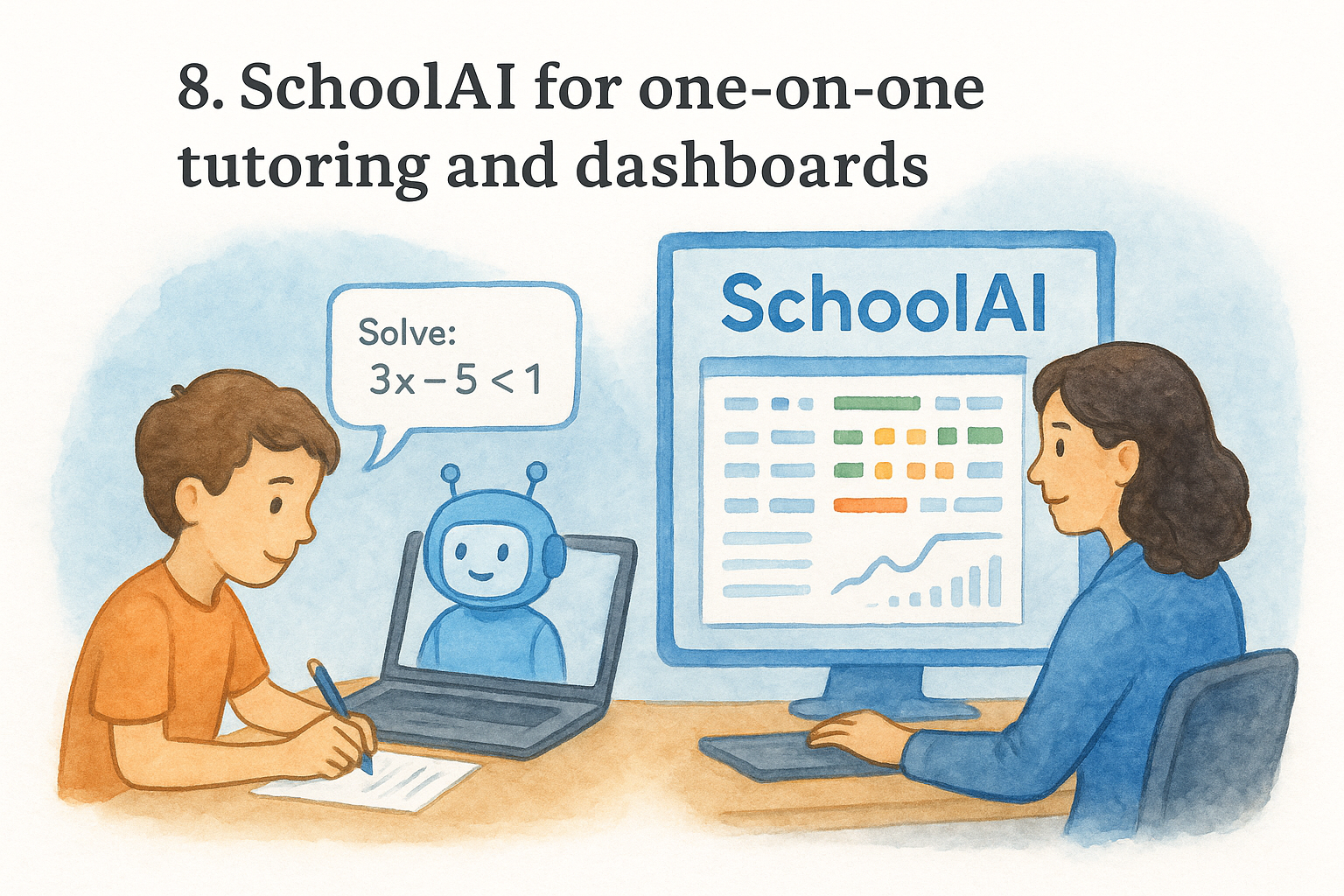
SchoolAI builds a version of one-on-one tutoring that a single teacher could never physically deliver to 30 students at once, and it does it through customizable AI "Sidekicks" that walk each student through math problems while you watch progress from a live dashboard. It’s earned a spot among the best ai tools for math teachers because it solves the exact problem every math class has: some kids need reteaching, some need extension, and you can’t be in two places at once.
How it works
You build or select a Sidekick tuned to a specific skill, say, solving multi-step inequalities, and set the guardrails for how much help it gives before nudging a student back to their own thinking. Students work through problems in a chat interface while the teacher dashboard shows real-time data on who’s stuck, who’s breezing through, and where common misconceptions are showing up across the room. That live view is what separates SchoolAI from a plain chatbot; you’re not just handing off tutoring, you’re monitoring it as it happens.
A dashboard that shows you where every student is stuck right now beats a stack of exit tickets you’ll grade tomorrow.
Who it’s for
SchoolAI suits teachers running station rotations or small-group instruction, since the dashboard lets you keep tabs on independent work while you’re pulled aside teaching a group. It’s also a strong fit for teachers piloting AI-supported differentiation strategies who want data on student thinking, not just final answers.
Pricing
SchoolAI offers a free tier for individual teachers that covers Sidekick creation and dashboard access, making it a real option among free ai tools for math teachers. School and district plans add advanced analytics and admin controls, priced through direct sales rather than a flat subscription, so budget for a conversation with your IT department before rolling it out schoolwide.
9. Eedi for pinpointing math misconceptions
Eedi takes a different angle than most tools on this list. Instead of just solving problems or generating practice, it’s built entirely around diagnosing why a student got something wrong in the first place. Every question in Eedi’s bank is a multiple-choice item where each wrong answer maps to a specific, well-documented misconception, so a wrong answer tells you something useful instead of just costing points.
How it works
Students work through diagnostic quizzes where every incorrect answer choice flags a known misconception rather than random distractors thrown in to fill space. If a student picks the answer for "multiplied instead of found a common denominator," Eedi logs exactly that, and the teacher report shows patterns across your whole class instead of a single percentage score. You can then assign a short follow-up quiz targeting just that misconception, which beats reteaching an entire unit because three kids missed one type of question.
A wrong answer only helps you teach better if you know exactly which mistake produced it.
Who it’s for
Eedi suits teachers who want diagnostic data, not just a score, especially in middle school math where misconceptions from earlier grades (like treating negative signs inconsistently) keep resurfacing in new units, and it slots neatly into fast formative check routines. It’s also a strong pick for intervention teachers and math coaches who need to justify grouping decisions with actual evidence rather than a gut feeling about who’s struggling.
Pricing
Eedi’s core diagnostic question bank and teacher dashboard are free for individual classroom use, putting it firmly in best free ai tools for math teachers territory. Schools and districts wanting bulk reporting, custom question sets, or integration with existing student data systems can arrange a paid plan directly with Eedi’s team.
10. Mathspace for adaptive step-by-step practice
Mathspace works like a digital workbook that actually adjusts to the student writing in it. Instead of handing back a single right-or-wrong mark, it asks students to show their work step by step, then flags the exact step where their reasoning went sideways. That level of detail makes it one of the more thorough math ai tools for teachers looking to replace generic worksheet packets with something that adapts in real time.
How it works
Students solve problems directly on screen, entering each step rather than jumping straight to a final answer, and Mathspace’s engine checks the work at every stage instead of just the end result. When a student stumbles, the platform serves up a hint or a worked example tied to that specific step, then adjusts the difficulty of the next problem based on how they performed. Like other digital tools that track student progress, Mathspace gives teachers a dashboard showing which steps trip up which students across an entire assignment, which turns grading from a guessing game into a pattern you can actually address in the next lesson.
Catching the exact step where reasoning breaks down teaches more than a red X next to a wrong final answer ever will.
Who it’s for
Mathspace suits teachers assigning regular practice sets who want more than a completion grade, particularly in middle school and algebra classes where showing work matters as much as the final answer. It’s also a strong fit for schools already running a curriculum built around mastery learning, since the adaptive difficulty naturally supports moving at each student’s pace instead of the whole class moving together.
Pricing
Mathspace offers a free trial period for individual teachers to test the adaptive practice and dashboard features. Full access runs on a school or district license rather than an individual teacher subscription, so getting it into your classroom usually means bringing it to a department or curriculum meeting first.
11. ChatGPT for generating problems and explanations
ChatGPT rounds out this list because, despite not being purpose-built for math, it’s still the most flexible tool here when you need something custom fast, and there are 45 classroom uses for ChatGPT beyond math alone. Need ten word problems about a road trip for a unit on rate and distance, written at a sixth-grade reading level? ChatGPT drafts that in seconds. It’s not always precise with multi-step calculations, so it earns a spot as a generation tool, not a grading tool.
How it works
You describe what you want in plain language, like "write five multiple-choice questions on solving one-variable inequalities, include one word problem," and ChatGPT drafts a full set you can edit before printing. It’s especially useful for explanations tailored to reading level, since you can ask it to rewrite the same concept three different ways for three different reading groups without starting from scratch each time. The catch: always check the actual math. ChatGPT occasionally botches arithmetic or writes a problem with no clean solution, so treat every output as a draft, not a final answer key.
Use ChatGPT to draft the wording of a problem, never to verify the math behind it.
Who it’s for
ChatGPT suits math teachers who need quick wording help, like rewriting a word problem for an IEP accommodation, generating warm-up questions on short notice, or drafting parent communication about a student’s progress. It’s less useful as a standalone student-facing tool since it lacks the built-in graphing and step-checking that dedicated math tools like Symbolab or Wolfram Alpha offer.
Pricing
The free version of ChatGPT covers most classroom drafting needs, including problem generation and rewrites, making it one of the more versatile free ai tools for math teachers. ChatGPT Plus adds faster response times and access to more capable models, running on a monthly subscription, though most teachers find the free tier enough for everyday planning tasks.
Picking the right AI for your classroom
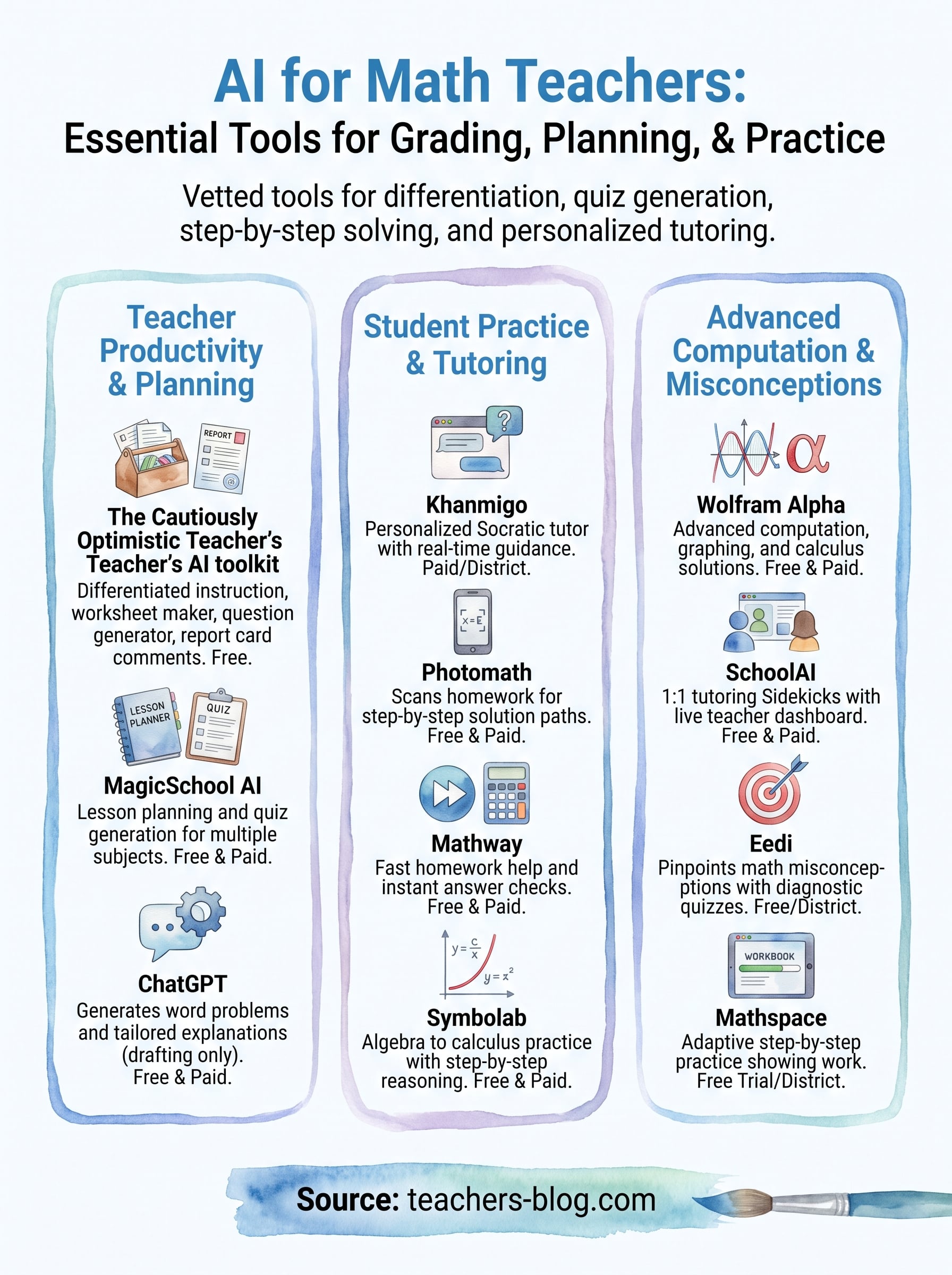
You don’t need all 11 of these running at once. Start with the problem eating the most hours out of your week. If it’s grading and differentiation, tackle that first. If it’s students stuck on homework at 9pm with no one to ask, hand them a step-by-step solver instead. The best ai for math teachers isn’t the flashiest one, it’s whichever tool actually gets used every week instead of bookmarked and forgotten.
Most teachers land on a small combination: one tool for planning, one for student practice, and one for diagnosing what’s actually going wrong in a student’s work. That mix covers the whole cycle without adding five new logins to manage.
If you’re looking for a place to start that costs nothing and takes five minutes to try, browse the free AI assistants for teachers and generate your first worksheet or set of report card comments tonight.