11 AI Prompts for Teachers to Save Hours of Planning
You didn’t get into teaching to spend Sunday night writing quiz questions or rewording the same objective five different ways for five different reading levels. Yet that’s where most planning time goes. AI prompts for teachers can hand that work back to you in minutes instead of hours, if you know exactly what to type.
That’s what this list is for. Below you’ll find 11 ready-to-use prompts you can paste straight into ChatGPT, Gemini, or Claude, covering everything from lesson planning and learning objectives to quizzes, discussion questions, and differentiated materials. No prompt engineering course required, just copy, tweak the grade level or topic, and go.
We built these prompts the way we build everything at The Cautiously Optimistic Teacher: for real classrooms, not hypothetical ones. Each one pairs naturally with our AI tools for comments, planning, and worksheets, including the Differentiated Instruction Helper, Worksheet Maker, and Question Generator, so you can move from prompt to finished resource without starting from a blank page. Whether you’re planning a unit on To Kill a Mockingbird or building a quick formative assessment, you’ll walk away with prompts you can use tonight, not someday.
1. Differentiate instruction for every learner in your class
Every class has the same problem: one lesson, ten reading levels, and practical differentiated instruction examples are what close that gap. Differentiation prompts solve the part that eats the most time, rewriting a single lesson into versions that stretch your advanced kids without losing the students who need extra scaffolding. This is the prompt teachers ask us about most, because it turns a two-hour rewrite into a five-minute copy-paste job.

Good differentiation isn’t about writing three separate lessons. It’s about writing one prompt smart enough to do it for you.
The prompt to copy
Paste this into your AI tool of choice, filling in the bracketed details:
Act as an experienced [grade level] teacher. I'm teaching a lesson on [topic/skill].
Create three versions of this lesson for a mixed-ability classroom:
1. A version for students who are below grade level, with simplified vocabulary,
   sentence starters, and a visual aid suggestion.
2. A version for students working at grade level.
3. An extension version for advanced students that adds a higher-order thinking
   task (analysis, synthesis, or creation).
For each version, include the learning objective, the main activity, and one
check-for-understanding question.
How to customize it
Swap the bracketed sections first: your grade level and the specific topic or skill, whether that’s fractions, the causes of World War I, or theme in Lord of the Flies. If you have students with IEPs or 504 plans, add a line specifying accommodations, like extended time, chunked text, or audio support, so the AI folds them into the below-grade-level version automatically. You can also ask it to add a fourth tier for English language learners, which is worth doing if that’s a regular need in your room.
Tips for best results
The output is a starting point, not a finished plan, so review it against your actual students before you print anything. A few habits make the results noticeably better:
- Name specific skills instead of vague topics (
2. Build a complete lesson plan in minutes
Some nights you don’t need three differentiated versions of a lesson, you just need a complete lesson plan you can teach tomorrow morning. This prompt builds one from scratch: objective, materials, warm-up, main activity, and closure, all in one pass. It’s the fastest way to turn a bare topic into something you can walk into class with, short of an AI lesson plan creator that does the same job in a few clicks.
A lesson plan prompt should hand you a skeleton you can teach from, not a wall of text you have to rewrite.
The prompt to copy
Copy this into your AI tool and fill in the brackets:
Act as a curriculum designer creating a lesson plan for [grade level] students on
[topic/skill]. The class period is [length, e.g., 50 minutes]. Structure the plan
with these sections:
1. Learning objective (one clear, measurable statement)
2. Materials needed
3. Warm-up (5 minutes)
4. Direct instruction or mini-lesson
5. Guided or independent practice activity
6. Closure/exit ticket question
Keep language student-friendly and align the activities to the stated objective.
How to customize it
Adjust the class period length to match your actual schedule, since a 90-minute block plan looks nothing like a 40-minute one. Mention your classroom setup, group desks, one-to-one devices, no technology, so the practice activity fits reality instead of requiring equipment you don’t have. If you’re teaching a specific text or standard, name it directly rather than describing it, since the AI aligns better to a cited standard number than a paraphrase.
Tips for best results
Ask for a second draft with tighter pacing if the first one feels rushed or padded. Request the exit ticket as a standalone question you can drop straight into Google Forms, saving another small step later.
3. Write clear, measurable learning objectives
Weak objectives are the root of most weak lessons. If you write "students will understand fractions," you can’t measure understanding, and neither can your students. Learning objective prompts force the AI to produce statements built on observable verbs, the kind of objectives students can actually meet that you can check against a quiz or exit ticket later.
An objective you can’t measure isn’t an objective, it’s a hope.
The prompt to copy
Paste this in and swap the brackets for your details:
Act as an instructional design expert. Write 3 measurable learning objectives for
a [grade level] lesson on [topic/skill]. Use Bloom's Taxonomy action verbs
(e.g., analyze, evaluate, construct) instead of vague verbs like "understand" or
"know." Align each objective to a specific level of Bloom's Taxonomy and note
which level you used. Keep each objective to one sentence.
How to customize it
Name the Bloom’s level you’re targeting if you already know it, remembering, applying, or evaluating, so the AI doesn’t default to the same middle tier every time. Mention the standard or unit goal the lesson supports, since objectives written in isolation rarely connect cleanly to your bigger unit plan otherwise. If you’re writing objectives for a full unit rather than one lesson, ask for a progression across five or six lessons that builds from simple recall to more complex analysis.
Tips for best results
Check that each verb actually matches an assessable action, not just a Bloom’s-sounding word dropped in for effect. Push back if an objective still reads vague, and ask the AI to rewrite it using a concrete product the student will create, like a diagram, paragraph, or labeled chart.
4. Generate a quiz that matches your learning objectives
A quiz only works if it actually tests what you taught, not a random grab bag of questions loosely related to the unit. Quiz generation prompts solve this by asking the AI to build questions directly from your stated objectives, so every item on the page maps back to something you can defend at a parent conference or a grade dispute. This is one of the fastest wins on this list, since a five-question formative assessment check that used to take twenty minutes now takes two.
A quiz should test your objectives, not your patience for writing questions.
The prompt to copy
Drop this into your AI tool and fill in the brackets:
Act as an assessment writer for [grade level] students. Create a [number]-question
quiz on [topic/skill] that directly assesses these learning objectives:
[paste your objectives]. Include a mix of multiple choice, short answer, and one
higher-order thinking question. Provide an answer key with a brief explanation
for each correct answer.
How to customize it
Paste your actual learning objectives from earlier rather than just the topic name, since the quiz quality depends entirely on what you feed it. Specify the question format ratio you want, say four multiple choice and one short answer, if your grading time is tight this week. Ask for a version formatted for Google Forms quizzes if you’re giving the quiz digitally, which saves you a retyping step.
Tips for best results
Read every distractor answer before printing, since AI sometimes writes multiple choice options that are too obviously wrong or accidentally correct. Request a second version with reordered answer choices if you’re giving the quiz across multiple class periods.
5. Create a fair and detailed grading rubric
Grading without a rubric means every essay gets judged against a slightly different standard, and students notice, which is why knowing how to create rubrics matters. Grading rubric prompts fix this by generating clear criteria and performance levels before you ever pick up a red pen, so your scoring is consistent from the first paper to the last.
A rubric written before grading starts is the only thing standing between you and playing favorites by accident.
The prompt to copy
Paste this into your AI tool and fill in the brackets:
Act as a veteran [grade level] teacher. Create a 4-point analytic rubric for a
[assignment type, e.g., persuasive essay] on [topic]. Include these criteria:
[list 3-4 criteria, e.g., thesis clarity, evidence, organization, grammar]. For
each criterion, write a specific description of what work looks like at the
Exemplary, Proficient, Developing, and Beginning levels. Format it as a table.
How to customize it
List your actual grading criteria instead of letting the AI guess them, since a rubric built on vague categories won’t hold up against a parent question. Match the point scale to whatever your gradebook already uses, whether that’s a 4-point scale or a straight percentage breakdown, so you’re not converting numbers later. Mention if this ties to a district rubric or state standard, and paste in the exact wording so the AI can echo it back.
Tips for best results
Read the Beginning-level descriptions first, since AI sometimes writes them too harshly or too vague to be useful feedback. Ask for a simplified, student-facing version you can hand out before the assignment is due, or run the same request through a dedicated AI rubric generator.
6. Make a custom worksheet from any topic
Sometimes you just need a worksheet, not a full lesson plan, not a rubric, just twenty practice problems or a reading passage with questions attached. Worksheet prompts turn a bare topic into a printable page in one shot, which is exactly the gap our AI worksheet maker for teachers was built to close if you’d rather skip the copy-paste step entirely.
A worksheet built from your exact keywords beats a generic one pulled off a search result every time.
The prompt to copy
Paste this into your AI tool and fill in the brackets:
Act as a [grade level] teacher creating a practice worksheet on [topic/skill].
Include a short instructions line at the top, [number] practice problems or
questions ranging from easy to challenging, and an answer key at the bottom.
Format it so it's ready to print, with clear numbering and spacing for student
work.
How to customize it
Name the exact skill or standard you’re practicing rather than a broad subject, since "fractions worksheet" produces a different result than "adding fractions with unlike denominators." Specify the question count and difficulty spread you want, five easy and five challenging, so the page matches your actual class period instead of running long. If the worksheet needs a reading passage attached, ask for the passage first and the questions second, so the two stay connected.
Tips for best results
Check every math problem by solving it yourself, since AI occasionally generates an answer key that doesn’t match the problem above it. Ask for a second version with different numbers if you’re using the worksheet as a retake or makeup assignment.
7. Spark discussion with critical thinking questions
A silent classroom after you ask "any questions?" usually means the questions weren’t good enough to answer. Discussion question prompts fix that the way a critical thinking question generator does, producing open-ended questions built to pull opinions and evidence out of students, not just yes-or-no responses. This pairs directly with our question-from-text generator if you’d rather feed in a text and get questions back without typing a prompt yourself.
A discussion question worth asking has more than one defensible answer.
The prompt to copy
Paste this into your AI tool and fill in the brackets:
Act as a [grade level] teacher leading a discussion on [topic/text]. Write 5
open-ended, critical thinking questions that require students to analyze,
evaluate, or defend a position, not just recall facts. For each question, include
a one-sentence note on what kind of answer would show strong thinking versus a
surface-level answer.
How to customize it
Name the exact text or topic you’re discussing, a chapter, a historical event, a current issue, rather than the subject in general, since specific source material produces sharper questions. Ask for a mix of question types, comparison, cause and effect, ethical judgment, if you want variety across a full class period instead of five similar prompts.
Tips for best results
Read each question aloud before class and imagine your quietest student answering it. If a question still invites a one-word reply, ask the AI to rewrite it starting with "why" or "to what extent" instead of "what."
8. Plan an icebreaker or warm-up activity
The first five minutes of class set the tone for the other forty. Warm-up activities and classroom icebreakers for quick connection get students settled and thinking before you launch into new material, but coming up with a fresh one every day burns out fast if you’re pulling from memory alone. This prompt generates quick, low-prep openers, the kind of bell ringer activities tied to whatever you’re teaching that day, so you’re not recycling the same word search for the third week running.
A good warm-up doesn’t just fill time, it primes students for the lesson that follows.
The prompt to copy
Paste this into your AI tool and fill in the brackets:
Act as a [grade level] teacher planning a 5-minute warm-up activity for a lesson
on [topic/skill]. Suggest 3 different options: one that reviews prior knowledge,
one that previews today's topic, and one purely for engagement or team-building.
For each, include the exact instructions you'd read aloud to students and any
materials needed.
How to customize it
Specify your class size and seating arrangement if the warm-up involves movement or partner work, since a 35-student room needs different logistics than a table of eight. Mention whether you want a silent, individual activity or something discussion-based, especially on days when you need students to settle quickly rather than get louder.
Tips for best results
Keep a running list of the ones that actually worked, since AI won’t remember which warm-ups landed with your specific group last month. Ask for a no-prep, no-materials version if you’re short on time between classes and can’t set anything up.
9. Draft personalized report card comments
Report card season means writing thirty versions of the same sentiment without repeating yourself or sounding like a form letter, which is why copy-and-paste comment templates help. Report card comment prompts solve the blank-page problem by turning a few notes about a student into a polished, individualized paragraph in seconds. Our personalized report card comment tool was built for exactly this crunch, but the prompt below works just as well if you’re typing straight into ChatGPT between conferences.
A report card comment should sound like you know the student, not like you copied a template.
The prompt to copy
Paste this into your AI tool and fill in the brackets:
Act as a [grade level] teacher writing a report card comment for a student named
[name]. Here are some notes: [list strengths, struggles, and specific examples].
Write a 3-4 sentence comment that is warm but honest, mentions one specific
strength, one specific area for growth, and one actionable next step. Avoid
generic phrases like "is a pleasure to have in class."
How to customize it
Feed the AI real, specific notes, a missed homework pattern, a strong lab report, a habit of helping classmates, since vague input produces vague comments no matter how good the prompt is. Set the tone you want, more formal for a struggling student’s parents, warmer for a student who’s thriving, so the comment matches the conversation you’d actually have in person. Ask for a shorter version too if your report card software has a character limit, which most do.
Tips for best results
Read every comment aloud before it goes home, since a phrase that looks fine on screen can land wrong to a parent reading it cold. Keep a bank of the notes you feed in each term, so next term’s comments can reference real growth instead of starting from scratch again.
10. Write parent updates and newsletters
Keeping parents in the loop matters, but writing a fresh classroom newsletter every other week competes with everything else on your plate. Parent update prompts turn a bullet list of what happened in class into a polished, friendly message in one pass, so the communication piece stops being the task you skip when the week gets busy.
A newsletter parents actually read is short, specific, and skips the jargon.
The prompt to copy
Paste this into your AI tool and fill in the brackets:
Act as a [grade level] teacher writing a classroom newsletter for parents. Here
are the highlights from the past [timeframe, e.g., two weeks]: [list topics
covered, upcoming events, and any reminders]. Write a friendly, concise
newsletter with a greeting, 3-4 short sections with headers, and a closing line
inviting questions. Keep the tone warm and avoid education jargon.
How to customize it
List your actual classroom highlights rather than a generic topic name, since parents want to know what their kid did this week, not a vague unit title. Mention your preferred format, email, a printed handout, a post on your parent communication app, since each one reads a little differently and the AI can adjust line length accordingly. Add any upcoming deadlines or events you need parents to act on, a permission slip, a project due date, so those don’t get buried at the bottom.
Tips for best results
Skip the jargon check yourself before sending, since terms like "formative assessment" mean nothing to most families. Ask for a shorter version too if you’re posting to an app with a character limit rather than sending a full email.
11. Create a behavior improvement plan for a student
One student’s disruptive pattern can eat up more of your energy than the other twenty-nine combined, and even with solid evidence-based behavior management tips, writing a formal plan from scratch takes time you don’t have between classes. Behavior improvement plan prompts turn a handful of observations into a structured document with clear goals and steps, the kind you can actually hand to an administrator or bring to a parent meeting without scrambling the night before.
A behavior plan works when the student can read it and immediately understand what success looks like tomorrow.
The prompt to copy
Paste this into your AI tool and fill in the brackets:
Act as a [grade level] teacher creating a behavior improvement plan for a student
who [describe the specific behavior, e.g., interrupts instruction, struggles to
stay on task]. Include: 1) a clear goal statement, 2) 3 specific, observable
strategies the student will practice, 3) 2 supports the teacher will provide,
4) a simple way to track progress daily or weekly. Keep the tone supportive, not
punitive, and use language a student could understand if read aloud to them.
How to customize it
Describe the actual behavior pattern you’ve observed, not a label, since "acts out" produces a vague plan while "talks over the teacher during direct instruction three or more times per class" produces one you can actually track. Name the tracking method your school already uses, a daily checklist, a point sheet sent home, so the plan slots into existing systems instead of creating a new one nobody follows. Mention if this needs to align with an existing IEP or 504 accommodation, and paste the relevant language so the AI doesn’t contradict it.
Tips for best results
Share the draft with your school counselor or administrator before finalizing it, since behavior plans often need a second set of eyes for consistency across the building. Ask for a version written directly to the student in first person if you plan to have them help set their own goals.
Where to go from here
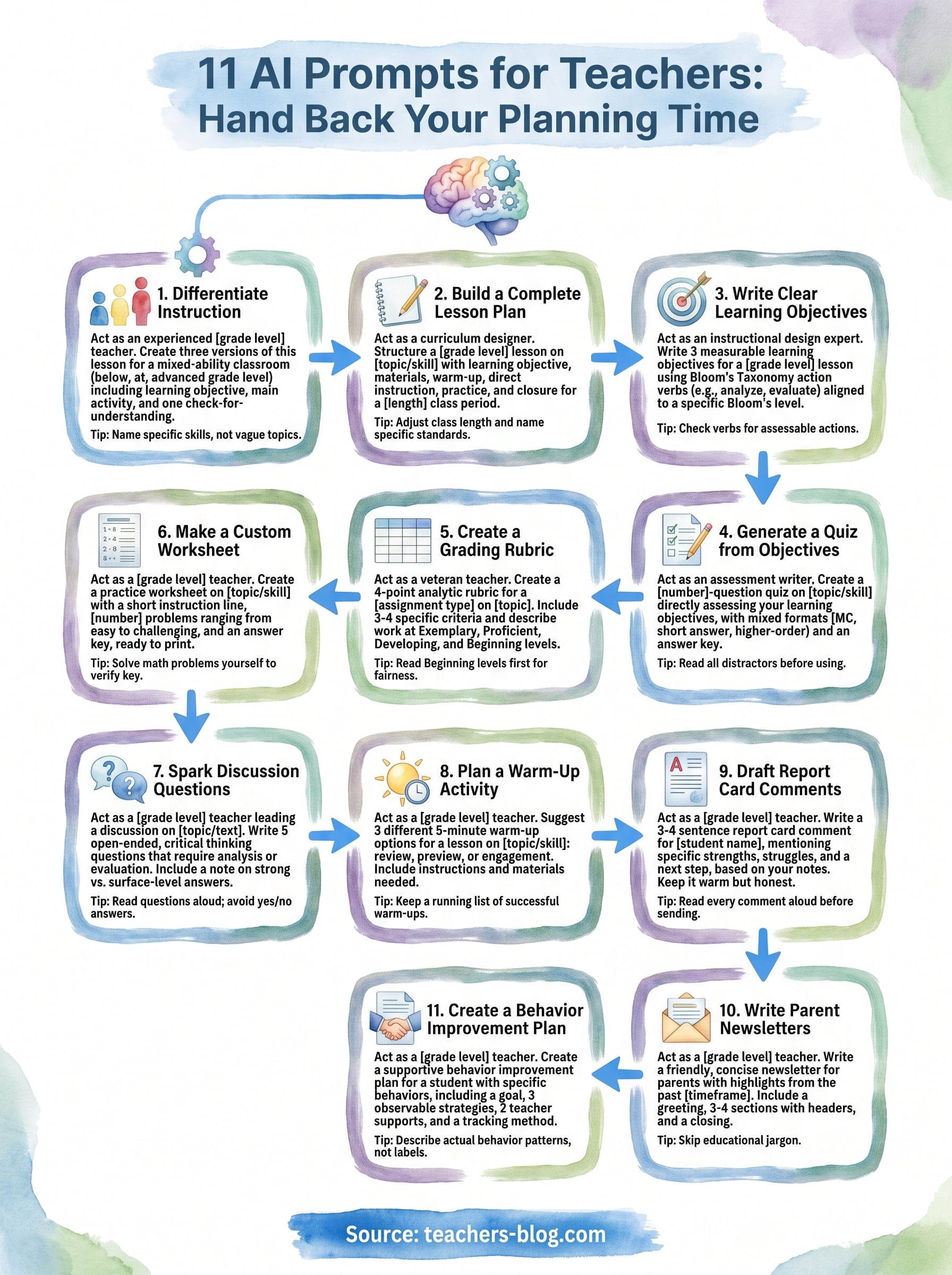
You now have 11 prompts that cover the bulk of what eats a teacher’s evening: lesson plans, objectives, quizzes, rubrics, worksheets, discussion questions, warm-ups, report card comments, newsletters, and behavior plans. None of them need special software or a prompt engineering background. Just copy, fill in your brackets, and edit what comes back with your own judgment about your students.
Treat these prompts as a starting toolkit, not a finished system. Save the ones that work best for your grade level, tweak the wording until the output matches your voice, and build a personal library you reuse every unit instead of rewriting from scratch each time. The goal isn’t to hand your teaching over to AI, it’s to get the busywork off your plate so you have more energy left for the parts of the job only you can do.
If you want more classroom-tested resources like this, browse the free AI assistants built specifically for teachers at The Cautiously Optimistic Teacher and put one to work tonight.