
5 Challenges Of Educational Technology (And Solutions)
You bought the tablets. You set up the accounts. You sat through the PD session. And somehow, the tech still isn’t doing what it promised. If that sounds familiar, you’re not alone, the challenges of educational technology hit almost every school, regardless of budget or district size. From Wi-Fi that cuts out mid-lesson to software that nobody was trained to use, the gap between "this will transform your classroom" and actual classroom reality can be painfully wide.
Here at The Cautiously Optimistic Teacher, we believe technology can make teaching better, but only when educators have honest information about what stands in the way. That means skipping the sales pitch and talking about what’s actually hard: funding, training, equity, infrastructure, and the constant pressure to adopt tools that may not even fit your students’ needs. These are real barriers that deserve real solutions, not just another webinar.
This article breaks down five of the most common obstacles teachers and schools face when implementing ed tech, and pairs each one with practical strategies you can act on. Whether you’re a classroom teacher trying to make one tool work or an admin rethinking a district-wide rollout, you’ll walk away with a clearer picture of what’s fixable, and how to fix it.
1. Teacher time, training, and ongoing support
One of the most persistent challenges of educational technology is that it gets handed to teachers without enough time or real support to use it well. The tool launches, the training ends, and you’re left figuring it out between classes.
What this challenge looks like in real classrooms
You’ve probably seen it: a new platform rolls out in September, a 45-minute walkthrough happens once, and by October half the staff has quietly stopped using it. Some tools arrive with no professional development at all, just a login and a link to a help center nobody has time to read.
Why it happens
Districts often purchase the license and treat training as an afterthought. Vendors provide one-time onboarding but no follow-up, and administrators assume teachers will figure it out independently. There’s rarely a dedicated budget line for ongoing support, so sustained learning simply doesn’t happen.
The real impact on students and teachers
When teachers don’t feel confident with a tool, they avoid it, and students miss the benefit it was supposed to provide. Teacher frustration builds fast when technology creates more work than it saves, which makes every future rollout harder to sell to your colleagues.
Poorly implemented technology doesn’t just fail students; it also erodes teacher trust in every future tool the district introduces.
Solutions that reduce lift for teachers fast
Start small and specific. Pick one tool and assign a low-stakes task to try with students this week. Pair new users with a colleague who already uses it comfortably. Here’s a simple starting framework:

- Week 1: Watch a 10-minute demo, no pressure to try it yet
- Week 2: Use the tool once with students for a single activity
- Week 3: Share what worked with a colleague or in a staff chat
How to build a simple training and support plan that lasts
Build a three-step cycle into your calendar: introduce the tool with a live demo, give teachers structured time to try it, then debrief what worked. Monthly check-ins keep momentum going without overwhelming anyone’s already full schedule.
Where AI tools can help without adding complexity
AI tools built specifically for teachers, like question generators or differentiation helpers, cut prep time rather than adding steps to your workflow. When a tool solves a problem you already have, the learning curve feels manageable and adoption actually sticks.
2. Budget limits and hidden total costs
Budget constraints rank among the top challenges of educational technology, and the sticker price rarely tells the full story. Schools often approve a purchase without accounting for the true cost of running the program year after year.
What schools often underestimate when they "buy edtech"
The license fee is just the beginning. Training, technical support, and device maintenance all carry real costs that never appear in the original proposal. Many districts approve a purchase without a multi-year budget projection in hand.
Why costs balloon after purchase
Vendors frequently price year one low, then raise renewal fees once your school depends on their platform. Hardware upgrades, IT time, and tiered support plans can quietly double the real cost within three years.
If you cannot see the three-year total cost before you sign, raise that question with your admin team before the contract goes through.
The impact on equity and program consistency
When budgets tighten mid-year, under-resourced classrooms absorb the cuts first. Devices go unrepaired, programs disappear, and students lose momentum right when they’ve built familiarity with a tool.
Solutions for stretching budgets without cutting quality
Choose multi-subject platforms over single-purpose apps, and lock in multi-year pricing upfront whenever possible. Prioritize tools with robust free tiers so low-stakes use cases don’t drain your budget unnecessarily.
What to ask vendors before you renew or expand
Before signing a renewal, get year-two and year-three pricing in writing. Confirm whether ongoing training and technical support are included in the contract or billed as separate line items.
3. Access gaps and unreliable infrastructure
Access problems are among the most frustrating challenges of educational technology because they sit outside your direct control. When devices fail or Wi-Fi drops, the lesson stops and no amount of preparation fixes it in real time.
The most common access and reliability breakdowns
The failures that derail lessons most often are shared carts with uncharged devices, slow school networks, and students who have no home internet access. Bandwidth bottlenecks hit hardest when multiple classrooms run video-heavy platforms simultaneously.
Why "1:1 devices" still doesn’t guarantee access
Even when every student has a device, home connectivity remains a real barrier. A Chromebook in a student’s bag means nothing if their family has no reliable broadband. Expired hotspot data plans and neighborhood coverage gaps leave students disconnected after the bell rings.
A device without connectivity is just an expensive notebook.
How access issues show up in grades, behavior, and stress
Students who cannot complete tech-dependent assignments at home fall behind quickly and often disengage in class out of embarrassment. Teacher stress builds fast when half the class is frozen on a loading screen while the other half moves forward.
Solutions for device, Wi-Fi, and classroom reliability
Maintain a small pool of charged backup devices and set up a clear check-out process. Work with your IT department to schedule high-bandwidth activities during off-peak network hours so you’re not competing with every other classroom at once.
Quick ways to plan for offline and low-bandwidth learning
Build a printable or offline version of every tech-dependent activity before the lesson starts. Keep a low-tech backup ready so a dropped connection never derails your class completely.
4. Student privacy, cybersecurity, and online safety
Privacy and security are among the most overlooked challenges of educational technology, yet the consequences of getting them wrong are serious and lasting. When schools adopt tools quickly, student data protection often gets treated as a legal checkbox rather than a real classroom priority.
What’s actually at risk with classroom technology
Student data includes names, ages, location, and behavioral patterns that many edtech platforms collect automatically. Without careful vetting, that information can be shared with third parties or stored on unsecured servers outside your district’s control.
Where privacy and safety issues usually start
Most problems begin at the tool selection stage, when schools approve platforms without reviewing data-sharing practices. Teachers often sign up for free tools independently without realizing those tools collect student information in ways that violate COPPA or FERPA.
Approving a tool before reading its data policy is the fastest way to create a compliance problem you cannot undo mid-year.
The impact on trust, learning time, and compliance
When a data incident occurs, it damages parent trust and pulls administrators into time-consuming legal reviews. Students lose learning time while schools work to fix what a stronger intake process could have prevented entirely.
Solutions for safer tool selection and safer daily use
Run every new tool through a basic privacy checklist before students touch it:

- Confirm the platform complies with FERPA and COPPA
- Disable data-sharing features wherever the settings allow
- Limit the personal information students enter during account setup
What to include in a practical classroom tech agreement
Give students and families a one-page tech agreement that lists which platforms you use, what data they collect, and how to report concerns. Keep it plain and specific so parents actually read it rather than sign it without a second glance.
5. Poor fit with curriculum and weak evidence of impact
One of the quieter challenges of educational technology is when tools simply don’t connect to what you’re teaching. A platform can look polished while delivering no real learning gain for your students.
How "cool tools" miss learning goals
Tools selected at the district level often bypass teacher input, so they arrive in classrooms already mismatched to your units. When a platform doesn’t tie to your current standards, it burns instructional time without moving student understanding forward.
Why schools struggle to evaluate what works
Most schools have no clear evaluation process before adopting edtech. Without success criteria defined upfront, you can’t tell whether a tool helped students learn or just kept them occupied.
If you can’t describe what success looks like before students log in, you won’t recognize failure either.
The impact on teacher buy-in and student outcomes
When tools miss learning goals, teacher skepticism hardens quickly, and that resistance spreads. Students notice teacher reluctance immediately, which drops engagement across the whole class and makes every future rollout a harder sell.
Solutions for aligning edtech to standards and instruction
Before any adoption, map the tool directly to your unit standards and lesson objectives. Bring teachers into the selection process early so the tool earns genuine buy-in before the contract is signed, not after.
Simple metrics to track so you can adjust with confidence
Track assessment scores, task completion rates, and student engagement before and after introducing a tool. These three signals give you a fast, honest read on whether to continue, adjust, or move on entirely.
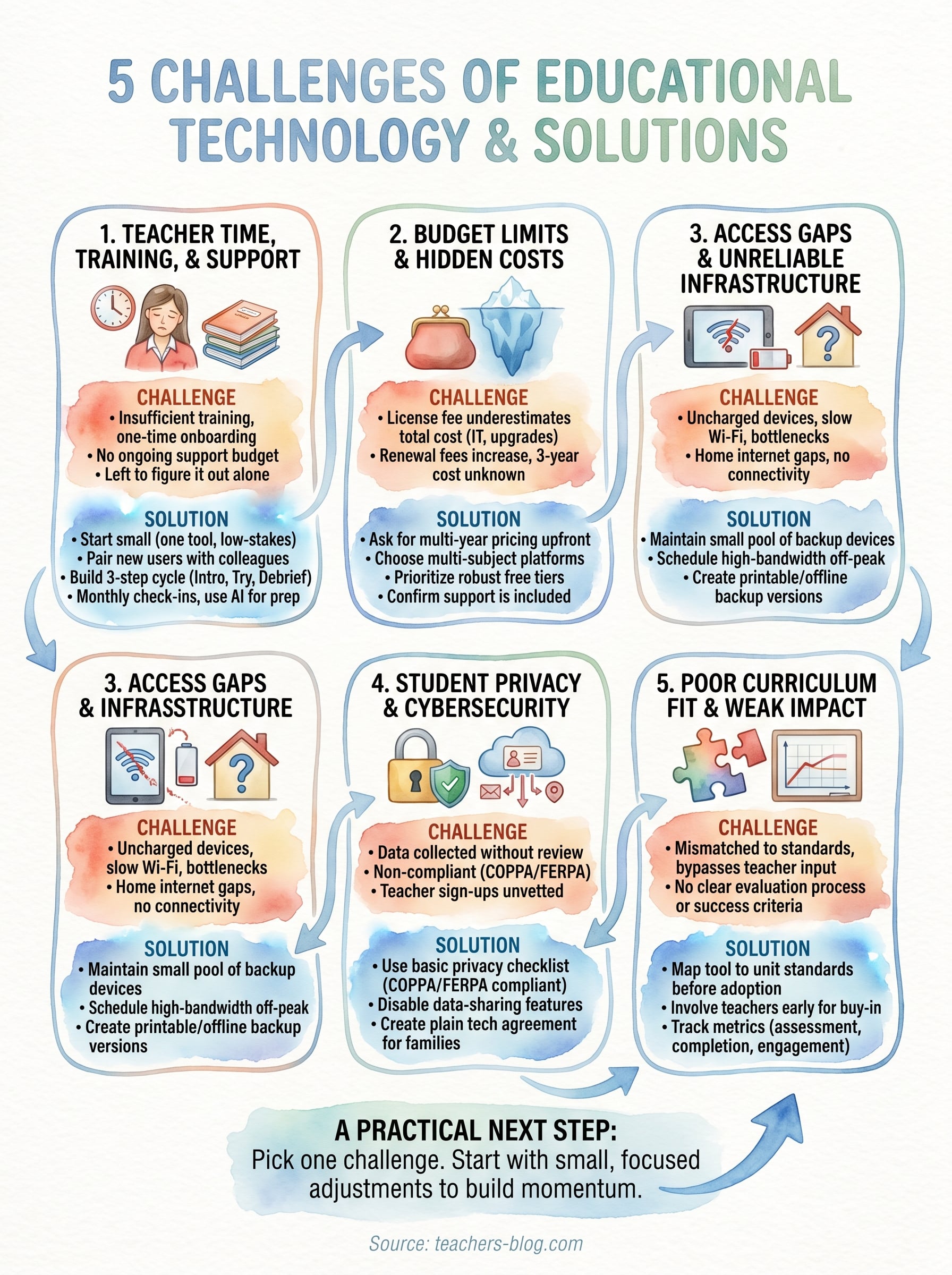
A practical next step
The challenges of educational technology are real, but none of them are permanent roadblocks. You now have a clearer picture of what actually breaks down in schools and classrooms, along with specific actions you can take to address each one without waiting for a district-wide initiative to give you permission.
Pick one challenge from this list that you’re facing right now. Start there, not with all five at once. Whether it’s tightening your tool vetting process or building a simple offline backup plan, one focused change beats five half-started ones every time. Deliberate, small adjustments compound quickly when you stay consistent with them over a full semester.
Your classroom doesn’t need a complete technology overhaul to get better results. It needs the right tools, used well, with real support behind them. For more practical strategies built for real teachers, explore resources at The Cautiously Optimistic Teacher and find what fits your classroom today.