12 Best Teacher Resume Templates to Land the Job
You know your classroom management is solid and your lesson plans get results, but none of that matters if your resume gets skimmed and tossed in ten seconds. Principals and hiring committees sort through stacks of applications during busy hiring seasons, and a generic Word template borrowed from a random job site won’t set you apart. That’s exactly why you’re searching for the best teacher resume templates, something built for education specifically, not repurposed from a corporate job hunt.
This list skips the templates that look nice but say nothing about your classroom impact. Each option here is chosen because it helps you highlight student outcomes, certifications, and classroom experience in a format hiring committees actually expect to see, whether you’re applying to your first teaching job or moving into a new district.
Below you’ll find 12 templates covering different needs: free teacher resume templates you can customize for budget-conscious job seekers, premium designs for teachers who want a polished edge, and formats suited to elementary, middle, and high school applications. We’ll also point out which templates work best for career-changers moving into teaching and which ones handle limited experience gracefully.
1. Canva teacher resume templates
Canva sits at the top of this list because it gives teachers the most design freedom without requiring any graphic design background. You drag, drop, and swap colors until the resume looks like something a design studio charged $200 for, and the education-specific templates already include sections for certifications, classroom management philosophy, and student growth data that generic builders leave out. If you’re hunting for the best teacher resume templates that balance visual polish with substance, Canva’s education category is the natural starting point.
Best for
Teachers who want a visually distinctive resume and don’t mind spending 30 to 45 minutes customizing layout details are the best fit for Canva. It particularly suits elementary and early childhood educators applying to private schools or charter networks, where a warmer, more colorful design tends to land well, and if you already use Canva for Education at school, the interface will feel immediately familiar. Art, music, and drama teachers also gravitate here, since a resume with visual flair reinforces the creative subject they teach.
Key features
Canva’s teacher templates come loaded with practical extras that most generic resume tools skip entirely.
- Matching cover letter and reference page templates in the same design family
- Icon libraries for skills sections (classroom tech, subjects taught, certifications)
- Built-in color palette suggestions that stay print-friendly and ATS-readable
- One-click resizing to convert your resume into a LinkedIn banner or portfolio cover
- Real-time collaboration if a mentor or career coach wants to review your draft
A resume that looks intentional, not decorated, is what actually gets a callback.
Pricing
Canva’s free tier unlocks a solid chunk of teacher resume templates, along with basic fonts and stock icons, so budget-conscious job seekers can build a complete resume without paying a cent. Canva Pro, priced around $12.99 per month or roughly $119.99 billed annually, unlocks premium templates, brand kit tools, and background remover features that help you drop in a professional headshot cleanly. Most teachers only need Pro for a single month during active job hunting season, then can downgrade back to free once the resume is finished.
| Plan | Cost | What You Get |
|---|---|---|
| Free | $0 | Core templates, basic fonts, limited icons |
| Pro (monthly) | $12.99/mo | Premium templates, brand kits, background remover |
| Pro (annual) | $119.99/yr | Same as monthly, discounted rate |
How to customize it
Open Canva, search "teacher resume" in the template bar, and filter by the education tag to skip templates meant for corporate roles. Once you pick a design, replace the placeholder text section by section, starting with your certification and endorsement details since those matter most to hiring committees. Swap the accent color to match your target district’s branding if you know it (many public schools use blue or green in their own materials), and keep your font size no smaller than 10.5pt so it stays readable when printed or scanned by applicant tracking systems. Export as a PDF rather than an image file to preserve searchable text, then run it through a free ATS checker before you submit anything.
2. Novoresume teacher resume templates
Novoresume built its reputation on ATS optimization, and that focus shows the moment you open one of its teacher templates. The layouts use a strict single or two-column structure with clear section breaks, so applicant tracking systems parse your certifications, degrees, and classroom experience without garbling the text. If you’re weighing teacher resume examples against each other, Novoresume’s score checker (it rates your resume against job description keywords in real time) makes it easy to see exactly where you’re missing terms a district’s software might flag.
Best for
This platform suits teachers applying to large public school districts, where an automated tracking system almost certainly screens applications before a human ever sees them. It also works well for career-changers entering education, since the guided prompts ask about transferable skills in a way generic templates don’t, helping you pivot skills from another field into classroom-relevant language.
If your resume can’t survive the software before it reaches a principal, the design underneath doesn’t matter.
Key features
Novoresume pairs clean design with functional tools built specifically for job seekers under time pressure:
- Real-time content scoring against job posting keywords
- Built-in resume checklist covering formatting, length, and grammar
- Matching cover letter templates with auto-filled contact details
- Multiple layout options ranging from one-page minimalist to two-page detailed formats
Pricing
Novoresume offers a free plan that covers one resume download in PDF format, which works fine for a single application. The Premium plan, priced around $19.99 for two weeks or roughly $29.99 monthly, unlocks all templates, unlimited downloads, and the full content-scoring feature. Most teachers only need the short-term plan to finish one strong resume during active job hunting.
How to customize it
Start by selecting the education-focused template, then fill in your teaching certifications and endorsements before anything else, since Novoresume’s algorithm weighs these fields heavily in its scoring tool. Paste the actual job posting into the checker to see which keywords you’re missing, then adjust your experience bullets accordingly rather than padding with generic filler language.
3. Zety teacher resume builder templates
Zety leans heavily on guided writing help, which makes it a strong pick if you freeze up staring at a blank resume. The builder suggests pre-written bullet points tailored to teaching roles, pulled from thousands of real job postings, so you’re editing rather than inventing from scratch. Among the best teacher resume templates on this list, Zety stands out for teachers who know their classroom impact but struggle to phrase it in resume language.
Best for
New teachers and recent education graduates get the most value here, since Zety’s suggested phrasing helps compensate for a thin work history, especially when paired with new teacher resume examples you can copy and adapt. It also suits teachers switching grade levels or subjects, where the built-in phrase library offers language for skills you haven’t had to describe on paper before, like differentiated instruction or IEP compliance.
Borrowed phrasing beats a blank page every time you’re stuck describing your own classroom work.
Key features
Zety’s teacher templates come with several practical writing aids:
- Pre-written, editable bullet suggestions organized by teaching role and grade band
- Built-in resume scoring that flags weak verbs and missing metrics
- Matching cover letter builder with the same design and font choices
- Downloadable formats in PDF, DOCX, and TXT for different application portals
Pricing
Zety doesn’t offer a fully free download, but it does let you build and preview your resume at no cost before paying. A 14-day trial runs about $2.70, after which it renews at roughly $24.70 monthly unless you cancel. Budget-conscious teachers should build the resume during the trial window, download it, then cancel before the renewal charge hits.
How to customize it
Answer Zety’s setup questions honestly, since the software uses your grade level and subject area to pull relevant bullet suggestions rather than generic corporate phrasing. Replace every suggested line with your own numbers where possible, swapping "improved student engagement" for something like "raised quarterly reading scores by 15 percent." Finally, run the built-in checker one more time before downloading to catch any leftover placeholder text.
4. MyPerfectResume teacher templates
MyPerfectResume markets itself as the fastest way to build a job-ready document, and for teachers juggling grading and lesson planning during a job search, that speed matters. The platform walks you through a step-by-step wizard rather than dropping you into a blank canvas, asking about your grade level, subject, and years in the classroom before generating a pre-formatted layout you just need to fill in. Among teacher resume templates built for speed over customization, this one gets you from zero to a submittable draft in under twenty minutes.
Best for
Substitute teachers and long-term subs applying to multiple districts at once benefit most here, since the wizard makes it fast to generate slightly different versions for each posting. It also suits teachers who dread the writing process entirely and just want a structured starting point rather than a design-heavy tool that demands creative decisions.
Speed beats polish when you’re applying to a dozen districts before winter break.
Key features
MyPerfectResume bundles a few features aimed squarely at reducing the time you spend staring at the screen:
- Step-by-step wizard that auto-generates draft bullet points by role
- Built-in spell check and grammar flagging before download
- Resume-cover letter pairing tool with matching formatting
- Expert-written phrase suggestions specific to elementary, middle, and high school roles
Pricing
The platform advertises a free trial, but full downloads require a subscription, typically around $2.95 for a 14-day trial period, renewing near $23.95 monthly if you don’t cancel. Job seekers on a tight timeline should treat the trial window as their working deadline, finishing and downloading the resume before renewal charges apply.
How to customize it
Answer the wizard’s prompts with your actual certifications and endorsement areas first, since those fields shape which bullet suggestions appear later in the process. Replace every generic suggested line with a specific classroom result, following proven ways to make a teaching resume stand out, then double-check formatting consistency across sections before exporting your final PDF.
5. ResumeBuilder.com teacher templates
ResumeBuilder.com positions itself as a research-backed platform, publishing its own hiring surveys and using that data to shape template design. The teacher-specific layouts reflect this, with sections ordered based on what the site’s own surveys of hiring managers say they scan first: certifications, then classroom experience, then education. Anyone comparing teacher resume templates for evidence of what actually gets noticed will appreciate that ResumeBuilder.com explains the reasoning behind its formatting choices instead of just handing you a blank layout.
Best for
Experienced teachers moving into administrative or coaching roles fit this tool well, since the templates include a dedicated leadership and mentorship section that most teacher-focused builders skip. Department heads and instructional coaches applying for assistant principal openings can use this structure to show progression along the teacher career path without cramming everything into a single classroom experience bullet list.
Key features
ResumeBuilder.com backs its templates with a few standout tools:
- Data-driven section ordering based on published hiring manager surveys
- Built-in expert review option where a real resume writer critiques your draft
- Leadership and professional development sections built specifically for career advancement
- Auto-formatting that adjusts spacing and margins as you add or remove content
A resume ordered the way hiring managers actually read gets more attention than one ordered the way you wrote it.
Pricing
Starting a resume on ResumeBuilder.com costs nothing, and you can preview the finished layout before paying anything. Downloading the completed PDF requires a subscription, generally around $1.95 for a short trial period, renewing near $23.70 monthly afterward. Teachers wanting the expert review feature should expect an additional fee, since that service sits outside the standard subscription tier.
How to customize it
Begin with the leadership section if you’re targeting a coordinator or coaching role, listing specific initiatives you’ve led rather than general responsibilities. Fill your classroom experience section next, pulling directly from lesson outcomes or test score improvements you can quantify. Consider paying for the expert review add-on if you’re applying to a competitive district, since a second set of trained eyes often catches phrasing issues you’ve stopped noticing after multiple drafts.
6. Etsy minimalist teacher resume templates
Etsy has quietly become a go-to marketplace for minimalist resume design, and independent designers there build teacher-specific templates you won’t find on the big-name builder platforms. These are Canva or Word files you purchase once, download, and own outright, without a monthly subscription hanging over your job search. If the templates above feel too corporate or too cluttered with builder-branded suggestions, Etsy’s small-business sellers tend to produce cleaner, more personal layouts aimed at teachers who want something distinctive without paying $20 a month for it.

Best for
Teachers who already know what they want to say and just need an attractive shell to put it in are the best match here. This route suits experienced educators who dislike guided wizards and prefer editing a clean template on their own terms. It also appeals to teachers hunting for something that doesn’t look like every other resume in the applicant pool, since Etsy sellers rarely reuse the same handful of layouts that dominate free builder sites.
A one-time purchase beats a recurring subscription when you only need to build a resume once a year.
Key features
Because these templates come from independent designers rather than a single platform, quality and extras vary by seller, but the best listings tend to include:
- Matching cover letter and reference sheet in the same design
- Both Canva link and Microsoft Word file formats included
- Instant digital download with no account or subscription required
- Instructions PDF explaining font substitutions if you don’t own the listed fonts
Pricing
Most Etsy teacher resume templates run between $4 and $15 as a one-time purchase, occasionally bundled with a teacher cover letter template for a few dollars more. There’s no recurring fee, which makes this one of the more affordable premium-feeling options on this list, especially compared to builder subscriptions that renew monthly whether you need them or not.
How to customize it
Check the listing description before buying to confirm whether the file opens in Canva (requires a free Canva account) or Microsoft Word, since editing steps differ. Replace placeholder text section by section, then swap in your own fonts if the listing’s fonts aren’t installed on your computer, following the seller’s included instructions PDF.
7. Teachers Pay Teachers editable templates
Teachers Pay Teachers isn’t just for free and editable TPT lesson plans and worksheets anymore. A growing number of sellers on the platform now list editable teacher resume templates built by actual classroom educators, not resume-writing companies guessing at what schools want to see. Because sellers understand education vocabulary firsthand, these templates tend to include sections most generic builders miss entirely, like standardized test score sections, curriculum names, and grade-band specific layouts for elementary versus secondary applicants.
Best for
This option suits teachers who want a template designed by someone who has actually sat on a hiring committee, rather than a general career site. It works especially well for elementary teachers and specialists (reading interventionists, ESL teachers, special education staff) since sellers on TPT often build templates around specific roles rather than a one-size-fits-all teaching resume.
A resume template written by a teacher, for teachers, speaks the hiring committee’s language without translation.
Key features
Teachers Pay Teachers listings vary by seller, but strong ones typically include:
- Grade-band specific layouts (elementary, middle, high school, specialist roles)
- Editable Google Slides or Canva versions included with purchase
- Sample filled-in resumes showing exactly how to phrase classroom achievements
- Companion cover letter templates using matching fonts and colors
Pricing
Most templates on TPT run between $3 and $10, occasionally bundled with a cover letter template or interview prep guide for a slightly higher price. Some sellers offer free versions with limited customization as a lead-in to their paid bundles, which is worth checking before you commit to a purchase. There’s no subscription involved, so once you buy it, you own the file permanently and can reuse it for future job searches without paying again.
How to customize it
Search "teacher resume template" directly in the TPT marketplace and filter by grade level to match your own teaching assignment. Open the file in whichever platform the seller specifies, usually Google Slides or Canva, then replace the sample text with your own certifications and classroom results, using the seller’s example resume as a phrasing guide rather than copying it word for word.
8. Microsoft Word teacher resume templates
Microsoft Word ships with a built-in library of resume templates, and several work well for teaching applications once you know where to look. You’ll find them under File > New, searching "resume" or "teacher resume" directly in the template gallery, no third-party account or download required. Because almost every school district office still runs Microsoft Office, submitting a resume in native .docx format sometimes reads as more compatible than a PDF exported from an outside builder, especially for districts whose application portals still expect Word files specifically.
Best for
This option suits teachers who already have Office installed through work or school and don’t want to learn a new platform during an already stressful job search. It also works well for older or slower computers, since Word runs locally without needing a strong internet connection, unlike browser-based builders that can lag while you’re saving changes.
Sometimes the fastest resume tool is the one already sitting on your desktop.
Key features
Word’s teacher-adjacent templates aren’t flashy, but they cover the basics reliably:
- Built-in templates accessible offline once downloaded once
- Compatibility with nearly every school district’s application portal
- Track Changes and Comments for feedback from a mentor teacher
- Simple table-based layouts that stay stable across different Word versions
Pricing
If you already have a Microsoft 365 subscription through work, school, or home use, these templates cost nothing extra. Without an existing subscription, Microsoft 365 Personal runs about $69.99 per year, though many teachers can access Office free through their school district’s staff license or a university alumni account, so check there before paying anything.
How to customize it
Open Word, select File > New, then type "resume" into the search bar to pull up the available templates, since Microsoft doesn’t always label them by profession. Replace the placeholder headings with education-specific sections like Certifications and Classroom Experience, borrowing from editable teacher resume styles built for the classroom, then save a backup copy before editing so you can revert if a table layout breaks. Export as PDF only after confirming the district’s application system doesn’t specifically request a .docx file.
9. Google Docs teacher resume templates
Google Docs offers a small built-in template gallery that includes a handful of resume layouts, accessible free to anyone with a Google account. Because the file lives in Google Drive, you can edit it from a school laptop, a personal computer, or even a phone during a free period without installing anything. For teachers comparing the best teacher resume templates by convenience alone, Google Docs wins simply because almost every district already runs on Google Workspace for Education, so the format feels familiar to hiring staff who open it.
Best for
Teachers who need to collaborate with a mentor, department chair, or career center advisor benefit most from this option, since real-time commenting lets someone else suggest edits without a messy email thread of attachments. It also suits anyone applying from a school-issued Chromebook, where installing Word or a browser-based builder isn’t practical.
A resume you can edit from any device beats one trapped on a single computer.
Key features
Google Docs keeps things simple, but the built-in tools cover what most applicants actually need:
- Free built-in template gallery accessible under Template Gallery > Resumes
- Real-time collaboration and comment threads for feedback from colleagues
- Automatic version history so you can revert to an earlier draft
- Direct export to PDF or DOCX without leaving the browser
Pricing
Google Docs costs nothing for personal Gmail accounts, and most school-issued Google Workspace accounts include it automatically at no extra charge to the teacher. There’s no premium tier to unlock, no trial period, and no subscription to cancel later, which makes this the most budget-friendly entry on this entire list.
How to customize it
Open Google Docs, click Template Gallery, and scroll to the Resumes row to find the built-in options, since teacher-specific templates aren’t separately labeled. Swap the placeholder headings for education sections like Certifications and Endorsements, then share the file with a trusted colleague using Comment access so they can flag weak phrasing before you finalize the export as a clean, searchable PDF.
10. Indeed resume builder templates
Indeed built its resume tool directly into the same platform where most districts post teaching openings, which means you can create, edit, and apply without ever leaving the site. The builder pulls from your existing Indeed profile if you’ve used the platform before, auto-filling work history and letting you adjust wording from there. Since so many teacher resume templates live behind separate builder sites, Indeed’s advantage is convenience: you upload once and apply to a dozen postings the same afternoon.
Best for
Teachers actively browsing and applying to multiple openings in one sitting get the most value here, since the resume builder sits one click away from the apply button on every listing. It also suits first-time job seekers who don’t yet have a polished resume anywhere else and want a simple, no-frills starting point, though it helps to bring your own teacher resume objective rather than relying on the auto-filled summary.
The best resume tool during crunch time is the one that doesn’t make you leave the job posting to use it.
Key features
Indeed keeps its builder functional rather than flashy, focusing on speed:
- Auto-fill from your existing Indeed job seeker profile
- Direct "apply with Indeed resume" button on matching job listings
- Basic formatting templates in both chronological and functional layouts
- Resume visibility toggle so recruiters can find your profile independently
Pricing
Indeed’s resume builder is completely free, with no trial period, subscription tier, or paywalled download to worry about. You create an account, build the resume, and download or apply directly at no cost, which makes it a reasonable backup option even if you build your primary resume somewhere else first.
How to customize it
Start from your Indeed profile if one exists, then rewrite the auto-filled bullet points with specific classroom results instead of leaving generic job description language in place. Choose the chronological layout for steady teaching histories, or the functional layout if you’re changing careers into education and want skills grouped ahead of a shorter work history.
11. Resume.io teacher templates
Resume.io focuses on speed and visual consistency, pairing a guided builder with templates that look like they came from a design agency rather than a free tool. Every section locks into a fixed layout, so you can’t accidentally break formatting by typing a long certification name or a lengthy list of endorsements. Compared to other teacher resume templates on this list, Resume.io sits in the middle: more polished than Word or Google Docs, less education-specific than TPT or Etsy sellers.
Best for
Teachers applying to private schools or international teaching positions tend to like this platform, since several templates lean toward a sleeker, more corporate aesthetic that reads well outside traditional public school hiring committees. It also suits anyone who wants a guided builder experience without Zety’s or MyPerfectResume’s heavier upsell prompts throughout the process.
Key features
Resume.io keeps its feature set tight but reliable:
- Locked layouts that prevent accidental formatting breaks
- Built-in resume examples by industry, including education
- Matching cover letter templates with synced fonts and colors
- Simple percentage-based completeness tracker while you build
A layout you can’t accidentally break matters more than one with endless customization options.
Pricing
Resume.io doesn’t offer a free download, but it lets you build the full resume before asking for payment. A 14-day trial runs about $2.95, renewing near $24.95 monthly if you forget to cancel. Teachers on a strict budget should treat the trial period as a hard deadline and download the finished PDF before that window closes.
How to customize it
Pick an education-adjacent template from the industry examples menu, then work through the builder’s prompts starting with certifications and licensure, since those fields anchor the rest of your teaching narrative. Replace every placeholder bullet with a specific, measurable classroom result, and use the completeness tracker as a checklist rather than a goal, since a 100 percent score doesn’t guarantee strong writing underneath it.
12. Venngage creative teacher resume templates
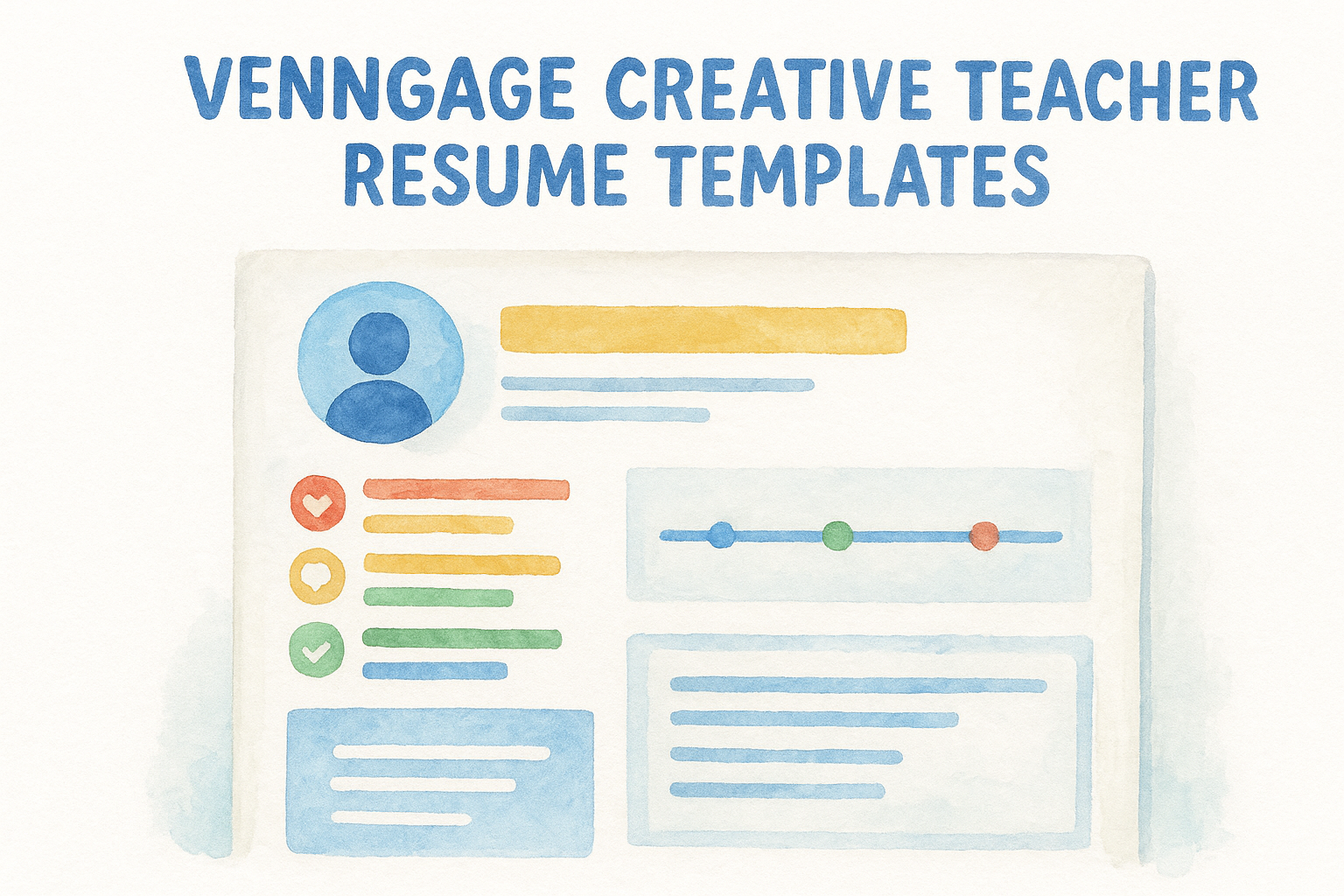
Venngage started as an infographic tool, and that history still shows in its resume templates today. Instead of plain text blocks, several teacher-focused layouts let you drop in small icon-based skill bars, timeline graphics for your teaching history, and color-coded sections that visually separate certifications from classroom achievements. If you’ve scrolled through every other entry on this list of teacher resume templates and still feel like your document looks flat, Venngage’s infographic-style approach is worth the detour.
Best for
Venngage suits teachers applying to progressive or arts-integrated schools, where a resume that visually demonstrates creativity works in your favor rather than against you. It also fits technology and media teachers who want their resume to double as a small proof point of their own design sense, plus anyone applying to a role where a teaching portfolio that gets you hired helps them stand out in a stack of otherwise identical PDFs.
A resume that shows your creativity, instead of just claiming it, sticks in a hiring committee’s memory longer.
Key features
Venngage’s teacher-adjacent templates bring a few extras that plainer builders skip entirely:
- Infographic-style skill bars and icon sets built for visual scanning
- Timeline graphics for laying out your teaching history year by year
- Data visualization blocks for showing test score gains or growth metrics
- Brand kit tool for keeping colors and fonts consistent across your cover letter
Pricing
Venngage offers a free plan that covers basic templates and limited downloads, enough to test the layout before committing further. The Premium plan, priced around $19 monthly or roughly $10 monthly billed annually, unlocks the full template library, PDF downloads, and premium icon sets. Teachers who only need one polished resume can often get by on the free tier alone.
How to customize it
Search the template library for "resume" and filter toward the more minimal, less chart-heavy options, since some infographic templates skew too visual for conservative hiring committees. Swap in your own certification timeline and test score data where the design calls for a graphic, then double-check that any color-coded section still reads clearly if printed in black and white.
Picking the template that works for you
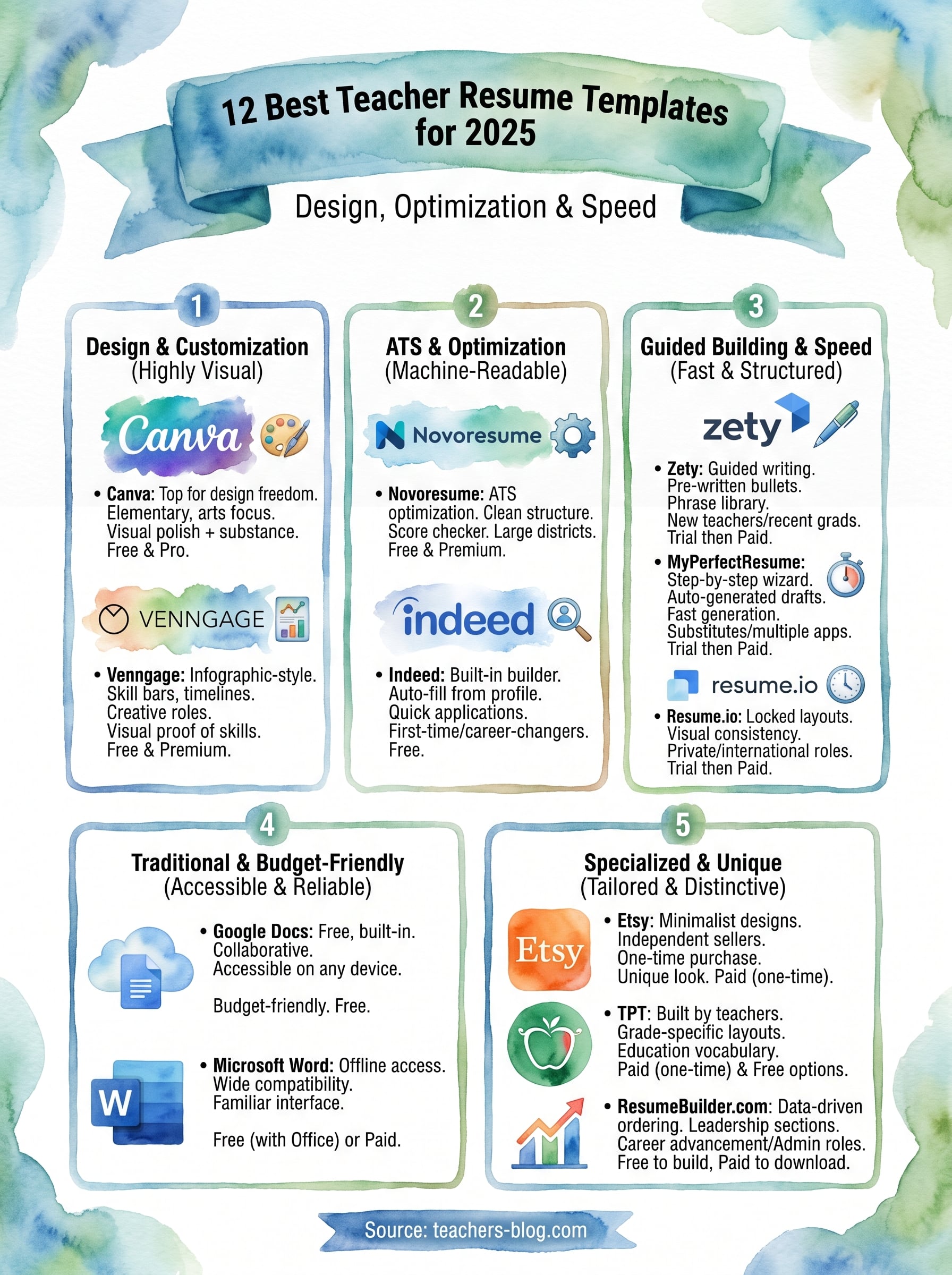
No single tool on this list beats the rest outright. The best teacher resume templates depend on your budget, your timeline, and how much design help you actually need. Grabbing a free Google Docs or Canva layout tonight beats agonizing over twelve options for another week while a posting closes without your application in it.
Start with whichever template matches your situation right now, fill in your certifications and classroom results first, and let the design details come second. A resume built from real numbers and specific outcomes will outperform a fancier template with vague bullet points every time.
Once your resume is polished, keep the momentum going. Start preparing now with common teacher interview questions and sample answers, so your next step after landing the interview is just as strong as your resume.