7 Best Free AI Worksheet Generators for Teachers
You’ve got a lesson planned for tomorrow, a topic that needs reinforcing, and zero time to build a worksheet from scratch. So you open a blank Google Doc, stare at it, and start typing bullet points that somehow never look as polished as the ones in your department’s shared drive. Sound familiar?
An ai worksheet generator for teachers solves exactly this problem. Type in a topic, grade level, or even a paragraph from your textbook, and these tools spit out a formatted, printable worksheet in seconds, often with an answer key attached. The best part is that a genuinely useful free ai worksheet generator for teachers exists, several actually, so you don’t need a district budget or a credit card to try one out.
I’ve tested a stack of these tools against real classroom needs: differentiation, standards alignment, question variety, and how much editing they leave you doing afterward. Below are the seven that actually held up, along with what each one does best and where it falls short, so you can pick the right one instead of guessing, and if you want a wider sweep, we compared fifteen worksheet-building tools here.
1. The Cautiously Optimistic Teacher’s Worksheet Maker
Top billing goes to our own tool because it was built by teachers who got tired of the same blank-page problem you’re facing right now. The Worksheet Maker takes a topic, a set of keywords, or a chunk of source text and turns it into a ready-to-print worksheet without asking you to fuss over formatting or fonts.
How it works
You type in a subject, grade band, and a handful of keywords or a short passage, then choose the question style you want, whether that’s short answer, multiple choice, or a mix, much like our companion tool that builds questions straight from a passage. The ai worksheet generator for teachers runs that input through its model and returns a clean, classroom-ready worksheet in under a minute, complete with a title header and space for student names.
Best features
What sets this one apart is control. You’re not stuck with whatever the algorithm decides is appropriate; you can regenerate individual questions, swap difficulty levels, and adjust the reading level without starting the whole worksheet over.
- Keyword-based generation: paste in vocabulary or concepts and get targeted questions built around them
- Answer keys included: every worksheet comes with a matching key, so grading doesn’t eat your evening
- Grade-level scaling: the same topic can be regenerated for a 6th-grade class or an AP section
- Export options: download as a printable PDF or copy the text straight into a Google Doc
If you can type a topic and a grade level, you can have a printable worksheet ready before your coffee gets cold.
Pricing and free plan limits
Here’s the part teachers actually care about: it’s free. There’s no paywall blocking basic worksheet generation, no trial period that expires, and no credit card required to sign up. You do need a free account to save your worksheets and access your history, but generating and downloading worksheets costs nothing. That makes it a genuinely usable free ai worksheet generator for teachers rather than a stripped-down demo meant to push you toward a paid tier. For teachers who need something dependable for weekly use, not just an occasional novelty, this is where I’d start.
2. MagicSchool AI
MagicSchool AI built its reputation as a full teacher toolkit, and worksheet generation is just one tool in a much larger box that includes lesson plan generator tools, rubrics, and IEP accommodations. If you already use it for other tasks, adding worksheets to your workflow feels natural rather than like signing up for yet another app.
How it works
Inside the platform, you pick the Worksheet Generator tool from a long list of options, then fill in a short form asking for subject, grade level, and topic. The tool leans on a library of pre-built prompt templates, so the output tends to follow a predictable structure rather than surprising you with formatting quirks.
Best features
What stands out here is breadth. Because MagicSchool AI houses dozens of tools under one login, you can generate a worksheet, then pivot to building a quiz or a parent email without leaving the site.
- Tool variety: worksheets sit alongside lesson planners, rubric builders, and text leveling
- Standards tagging: many templates let you reference state standards directly
- Multi-language support: generate the same worksheet in Spanish or other languages
A worksheet generator that lives inside a bigger toolkit saves you from juggling five separate logins.
Pricing and free plan limits
MagicSchool AI offers a free tier, but it caps the number of monthly generations across all its tools combined, not just worksheets. Heavy users often hit that ceiling fast and get nudged toward the paid MagicSchool Plus subscription.
3. Diffit
Diffit built its entire identity around one specific pain point: differentiation. Instead of generating a single worksheet, it takes a text, topic, or even a URL and produces the same content leveled for multiple reading abilities at once, which matters a lot if your classroom spans several reading levels in one period, the same problem our own free tiered text generator was built to solve.

How it works
Paste in a topic, upload a document, or drop in a link to an article, and Diffit’s engine analyzes the content before generating leveled versions of the material. From there, you select which grade bands you need, and the tool builds out differentiated worksheets alongside vocabulary lists and comprehension questions matched to each level.
Best features
Diffit’s standout strength is speed at scale, and it covers ground that a library service like Newsela handles for teachers in a different way. You can generate five reading levels of the same worksheet in the time it takes most tools to produce one.
- Text leveling: adjusts vocabulary and sentence complexity automatically
- Source flexibility: works from pasted text, uploaded PDFs, or web links
- Built-in vocabulary support: pulls key terms and definitions from the source material
One worksheet, five reading levels, zero extra typing on your part.
Pricing and free plan limits
Registering for a free account gets you a limited number of generations per month, enough for occasional use but tight if you’re building materials for multiple classes weekly. Upgrading unlocks unlimited generations and removes the monthly cap entirely.
4. Eduaide.AI
Eduaide.AI markets itself as a lesson-design assistant first and a worksheet tool second, which shows in how much context it asks for before generating anything. Teachers who want a quick one-off worksheet sometimes find the setup slower than a dedicated ai worksheet generator for teachers, but the payoff is output that fits tightly into a broader lesson arc rather than standing alone.
How it works
Start by describing your lesson objective, the grade level, and any standards you’re targeting, then Eduaide.AI suggests a worksheet structure built around that objective rather than a generic template. Selecting the resource type triggers the generator to pull in question formats, from close reading prompts to short-answer sets, that match the pedagogical goal you entered rather than just the topic keyword.
Best features
Depth is the draw here. Eduaide.AI leans on instructional design principles, so worksheets often include scaffolded question sequences that build from recall to analysis instead of a flat list of similar-difficulty items.
- Objective-driven prompts: worksheets align to stated learning goals, not just topics
- Resource library: saved worksheets sit alongside lesson plans and slideshows for easy reuse
- Rubric pairing: generate a matching rubric right after building the worksheet, one of several tools that build rubrics with AI
A worksheet built around your objective teaches better than one built around a keyword.
Pricing and free plan limits
The free account gives you a modest monthly credit allowance that covers occasional worksheet generation but runs out quickly if you’re building for several preps a week. Eduaide.AI’s paid tier removes the credit ceiling and unlocks additional resource types, which makes sense once you’re relying on it regularly rather than testing it out.
5. Canva for Education
Canva for Education brings AI worksheet creation into a design tool millions of teachers already use for slides and posters, which means the learning curve is close to zero if you’ve ever dragged an image into a Canva template. Instead of a plain text output, you get a fully designed page with color, icons, and layout choices baked in from the start.
How it works
Opening the Magic Design feature and typing a prompt, like "fractions worksheet for 4th grade," generates a handful of template options you can click through and customize. Editing text, swapping images, or adding your own branding happens in the same drag-and-drop editor you’d use for any other Canva project, so nothing about the process feels unfamiliar.
Best features
Visual polish is Canva’s clear advantage over most other tools on this list. A worksheet generator that also hands you design control means your handouts look like something you’d want to post on a classroom wall, not just a text dump on paper.
- Template variety: thousands of pre-built worksheet layouts across subjects
- Full design editing: change colors, fonts, and images after generation
- Classroom branding: add your school logo or class theme consistently
A worksheet that looks good gets read more carefully than one that looks like a rough draft.
Pricing and free plan limits
Canva for Education is free for verified K-12 teachers and includes premium templates and AI features normally locked behind a paid Canva Pro account. Verification through your school email is the only real requirement to unlock the full toolkit at no cost, and our guide walks through how to set up Canva for Education step by step.
6. Brisk Teaching
Brisk Teaching works differently from every other tool on this list because it lives inside your browser as a Chrome extension rather than a standalone website. That design choice matters if you spend your planning time inside Google Docs, Google Classroom, or a webpage you’re about to turn into a lesson, since you never have to copy and paste content between tabs.
How it works
Install the Brisk extension, open any Google Doc, article, or Slides file, and click the Brisk icon to bring up a sidebar of generation tools. Selecting the worksheet option there prompts you for grade level and question type, then builds the worksheet directly from whatever text is on your screen, which makes it one of the faster paths to a usable ai worksheet generator for teachers if your source material already exists online.
Best features
Context awareness is what sets Brisk apart. Because it reads the actual page or document you’re working from, worksheets stay tightly tied to your existing curriculum instead of generic topic prompts.
The best worksheet tool is the one that doesn’t make you leave the tab you’re already working in.
- Browser integration: works inside Docs, Classroom, and most webpages
- Source-based questions: pulls directly from the text you’re viewing
- Quick differentiation: adjust reading level without regenerating from scratch
Pricing and free plan limits
Brisk’s free tier covers a set number of monthly uses across all its tools, worksheets included, with a paid plan removing that ceiling for daily classroom use.
7. Monsha AI
Monsha AI rounds out this list as the newest entrant, built specifically around fast worksheet generation rather than trying to be a full teaching suite. If you want a lightweight ai worksheet generator for teachers without wading through dozens of unrelated tools, Monsha AI keeps the interface stripped down to exactly what you need.
How it works
Entering a topic, grade level, and preferred question count on Monsha AI’s single-page form triggers generation within seconds, no account setup required to see a preview. Selecting from short answer, fill-in-the-blank, or multiple choice formats happens before you click generate, so you’re not reformatting output after the fact.
Best features
Simplicity is Monsha AI’s biggest selling point. Nothing about the layout distracts you from the task of getting a worksheet built and printed within a couple of minutes.
- One-page workflow: no dashboard, no tool menu, just a form and a result
- Instant preview: see the worksheet before committing to a download
- Print-ready formatting: output arrives already spaced for standard paper sizes
Sometimes the best tool is the one that gets out of your way fastest.
Pricing and free plan limits
Generating worksheets on Monsha AI costs nothing right now, with no login wall blocking basic use. Because it’s a newer, smaller service, expect the free tier’s limits to shift as the tool matures, so check back if you’re relying on it for weekly planning.
Finding the right generator for your classroom
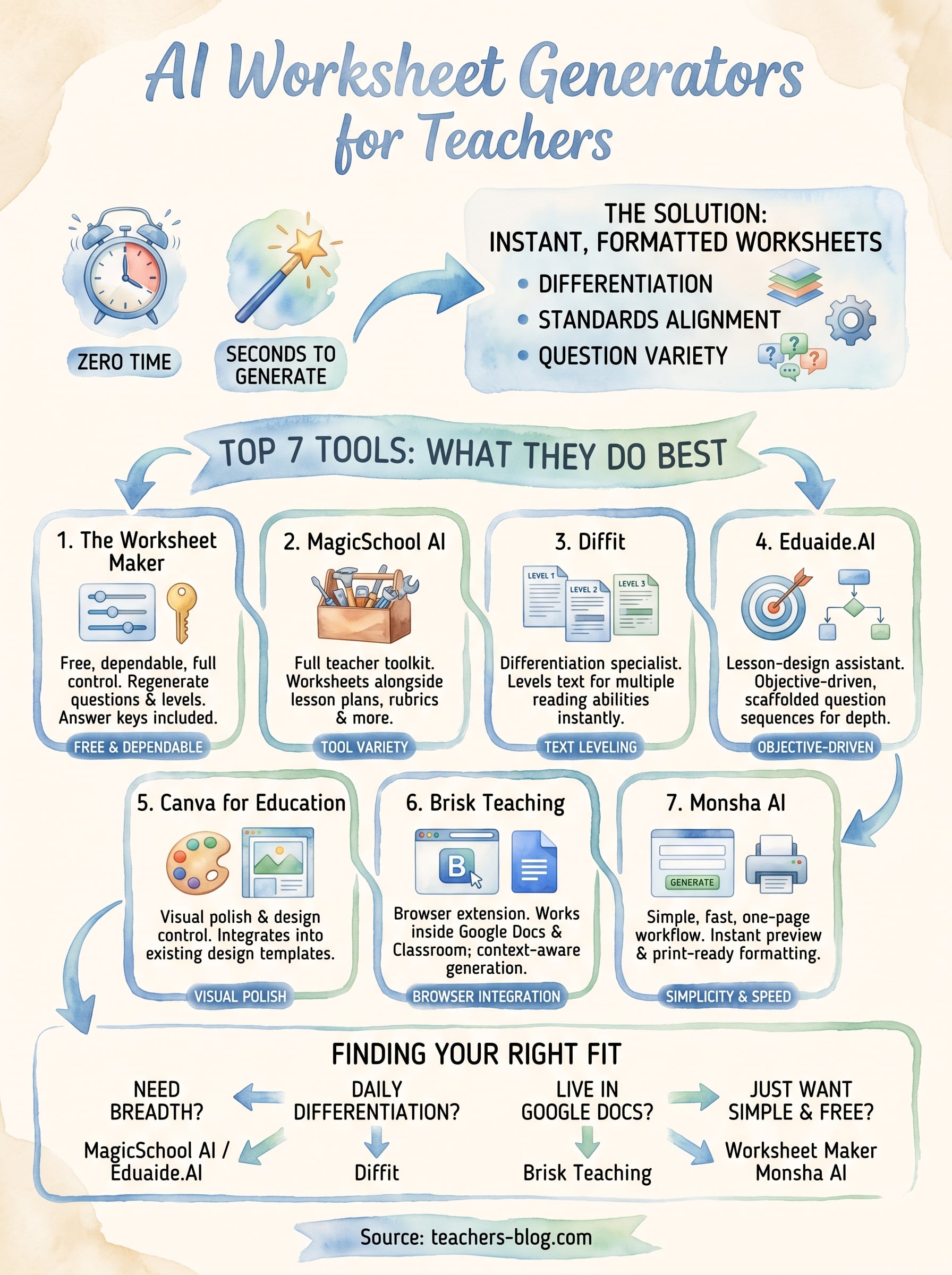
Every tool on this list solves the same blank-page problem, but the right pick depends on how you actually plan. If you want breadth, MagicSchool AI or Eduaide.AI fold worksheets into a bigger toolkit. If differentiation across reading levels is your daily headache, Diffit earns its spot. If you live in Google Docs, Brisk’s browser extension skips a step nobody else does. But if you just want a free ai worksheet generator for teachers that works every time without hitting a monthly wall or asking for a credit card, that’s exactly why we built the Worksheet Maker in the first place.
Don’t overthink this decision. Try two or three of these tools on a real lesson this week and see which output needs the least editing before it hits the printer. That’s the only test that actually matters.
Ready to skip the trial-and-error and start with the tool built for exactly this? Head over to our free AI worksheet maker and generate your first printable worksheet in minutes.