
7 AI Tools for Student Engagement Teachers Will Use in 2026
Most teachers don’t need convincing that AI is changing education, they need someone to cut through the noise and point them toward tools that actually work. That’s exactly why we built The Cautiously Optimistic Teacher: to test, evaluate, and recommend resources that make a real difference in the classroom. And right now, ai tools for student engagement are the most requested topic in our community.
The problem isn’t a lack of options. It’s the opposite. Hundreds of platforms claim to boost participation and personalize learning, but many are overhyped, overpriced, or just a flashy skin on a basic quiz app. Teachers deserve better than trial-and-error when their planning time is already stretched thin. You need specific recommendations backed by practical classroom use, not a generic software directory.
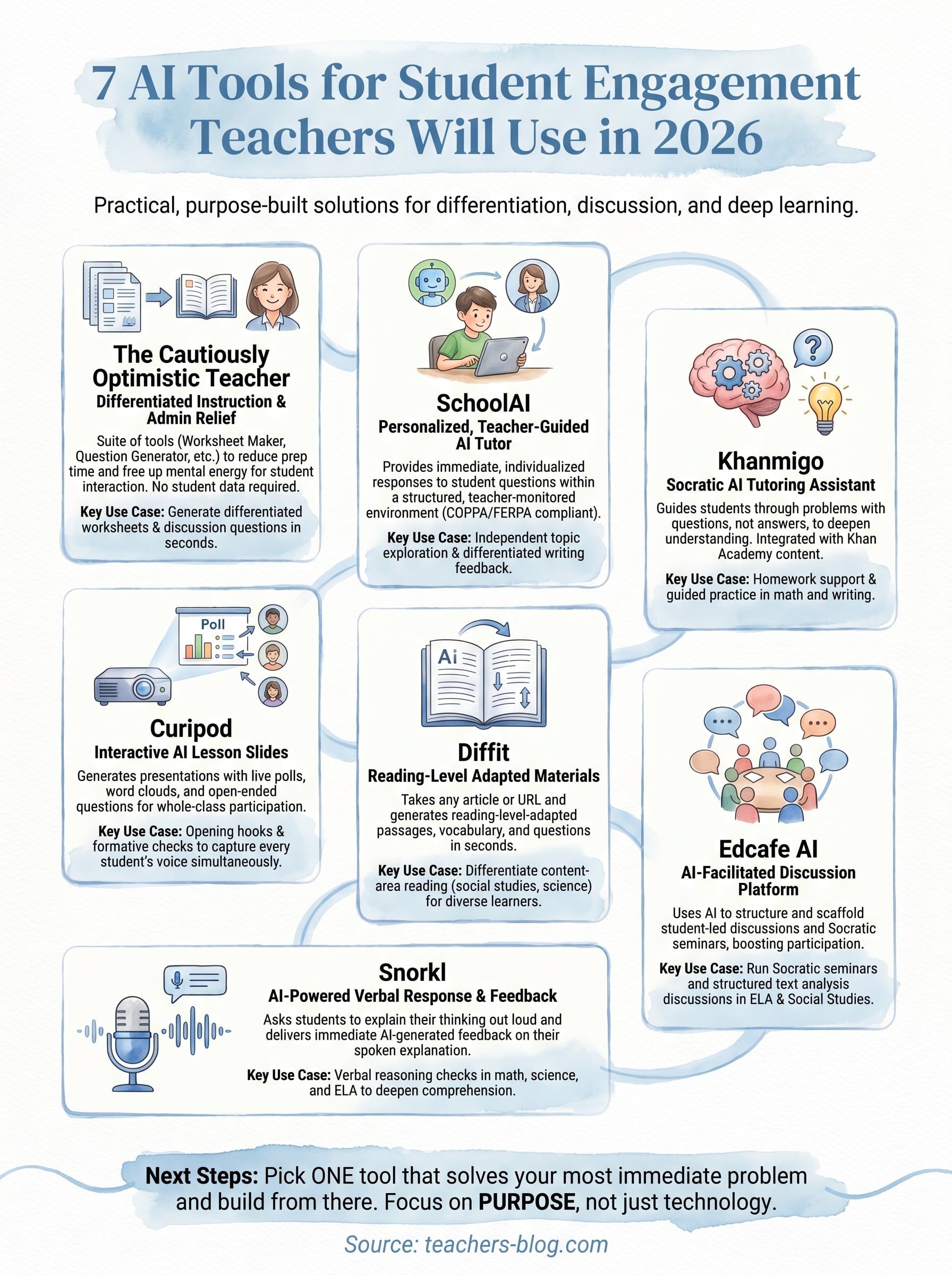
This article breaks down seven AI tools that are earning real traction with educators in 2026. Each one targets a different aspect of engagement, from sparking discussion to adapting content for diverse learners. Whether you’re looking to increase participation in a quiet class or personalize instruction without doubling your workload, you’ll walk away with concrete options you can test this week.
1. The Cautiously Optimistic Teacher AI Tools
The Cautiously Optimistic Teacher offers a suite of AI-powered tools built specifically for classroom educators. These tools are not general-purpose AI chatbots repurposed for education; they are purpose-built to address specific teacher pain points like differentiation, worksheet creation, and report card writing.
What it is and why it boosts engagement
Among the most practical ai tools for student engagement available today, the site currently offers seven focused tools: the Differentiated Instructor, Worksheet Generator, Leveled Text Creator, Writing Feedback Generator, Report Card Assistant, PEEL Paragraph Assistant, and Mythology Flash Fiction Assistant. When teachers spend less time on prep and admin, they free up mental energy to actually engage with students. That shift changes classroom dynamics fast.
Engagement improves when teachers show up prepared and present, not exhausted from hours of administrative work.
Best classroom use cases
The Worksheet Generator and Leveled Text Creator can support engagement when students need practice material or a text at a more appropriate reading level. You can use these tools to adapt a text or turn existing material into a worksheet draft, which means more time for real discussion and less time buried in prep work.
- Generate differentiated worksheets for multiple reading levels in one session
- Create discussion questions from primary source texts or articles
- Build personalized report card comments that reflect individual student progress
Setup and workflow tips for teachers
You do not need any technical background to start using these tools. Sign in, select your tool, and enter your content or keywords. Most teachers get usable output within a few minutes on their first session. Build this into your Sunday planning routine and you will notice the difference quickly.
Privacy, safety, and guardrails
These tools are designed for educator workflows, but teachers should still follow their school or board’s privacy rules for AI use. Avoid entering personally identifiable, confidential, or otherwise sensitive student information unless that use has been explicitly approved.
Pricing and access
The current educational AI assistants are available free through The Cautiously Optimistic Teacher. Visit the Free Educational AI Assistants page to see the tools that are currently available.
2. SchoolAI
SchoolAI is an AI-powered learning platform built to give teachers control over how students interact with AI in the classroom. Rather than letting students use unmonitored chatbots, SchoolAI creates a structured, teacher-guided environment where you set the boundaries and the goals.
What it is and why it boosts engagement
SchoolAI stands out among ai tools for student engagement because it puts a personalized AI tutor in front of every student while keeping you in charge. Students get immediate, individualized responses to their questions, which keeps them moving forward instead of waiting for help.
When students receive real-time feedback on their thinking, they stay curious and on task longer.
Best classroom use cases
SchoolAI works well when you want students to explore topics independently or work through problems at their own pace. It handles differentiated writing feedback and subject-specific tutoring without replacing your direct instruction.
- Run independent reading stations with AI-guided comprehension checks
- Use it for differentiated math or writing support during workshop rotations
Setup and workflow tips for teachers
You create a customized "Space" for your class, which means you control the topic, tone, and scope of what the AI discusses with students. Most teachers complete their first Space setup in about 15 minutes.
Privacy, safety, and guardrails
SchoolAI is COPPA and FERPA compliant, and you can monitor all student conversations in real time through a live teacher dashboard.
Pricing and access
SchoolAI offers a free tier for individual teachers and paid school or district plans with expanded features and administrative controls.
3. Khanmigo by Khan Academy
Khanmigo is Khan Academy’s AI-powered tutoring assistant, designed to guide students through problems with questions rather than just handing over answers. It functions as a Socratic tutor, prompting students to think harder instead of doing the thinking for them.
What it is and why it boosts engagement
Among the ai tools for student engagement built around genuine learning, Khanmigo holds a strong position. It keeps students actively involved in the problem-solving process by asking follow-up questions, which pushes them to articulate their reasoning and stay mentally present.
Students who explain their thinking out loud retain concepts significantly better than those who passively receive answers.
Best classroom use cases
Khanmigo fits best in math and writing instruction, where step-by-step reasoning matters most. It guides students through Khan Academy’s existing content library, making it a strong fit for homework support or guided practice stations.
- Support struggling students during independent work blocks
- Use writing coach mode to give feedback on student essays
Setup and workflow tips for teachers
You link Khanmigo directly to your existing Khan Academy teacher account, so there is no separate onboarding process. Assign it to specific exercises and your students pick up right where they need support.
Privacy, safety, and guardrails
Khan Academy built Khanmigo with strict content filters and teacher visibility built in. You can review student interactions through your teacher dashboard at any point.
Pricing and access
Khanmigo is available through Khan Academy’s platform with a paid subscription, and discounted access exists for qualifying schools and districts.
4. Curipod
Curipod is an AI-powered lesson creation tool that generates interactive slides with polls, word clouds, and open-ended response activities built directly into each deck. It sits in a different category from tutoring tools because it focuses on whole-class participation rather than one-on-one support.

What it is and why it boosts engagement
Curipod turns passive slide presentations into live, participatory experiences where every student submits a response on their device. This shifts the dynamic from one voice at the front of the room to the entire class weighing in simultaneously, which makes it one of the more effective ai tools for student engagement in a whole-group setting.
When every student submits a response at once, no one can quietly coast through a lesson unnoticed.
Best classroom use cases
Curipod works best as an opening hook or a formative check at the close of a unit. You can use it to surface misconceptions before you teach a concept or to consolidate understanding after one.
- Launch a new topic with an AI-generated word cloud activity
- Run quick polls to gauge prior knowledge before direct instruction
Setup and workflow tips for teachers
You type in your lesson topic, and Curipod builds a ready-to-use slide deck automatically. Most teachers edit and launch their first lesson in under ten minutes, with no design work required.
Privacy, safety, and guardrails
Curipod keeps student responses anonymous during class activities, which encourages more honest participation. The platform follows standard school data privacy practices for classroom tools.
Pricing and access
Curipod offers a free plan for individual teachers, with paid tiers that unlock additional AI generation credits and expanded class management features.
5. Diffit
Diffit takes any article, URL, or topic and generates reading-level-adapted materials in seconds, making it one of the most practical ai tools for student engagement when your class reads across a wide range of levels.

What it is and why it boosts engagement
Every student gets access to the same core content at the right reading level, which means no one sits out because a text is too hard or too easy. Students stay engaged when they can actually access what they’re reading.
Reading engagement drops sharply when students face a text far above or below their level.
Best classroom use cases
Diffit works best for content-area reading in social studies, science, or English. You paste in a URL or topic and get vocabulary lists, comprehension questions, and a leveled passage in one shot.
- Differentiate a news article across four reading levels simultaneously
- Generate vocabulary support for ELL students on the same lesson content
Setup and workflow tips for teachers
You paste a URL or type a topic, select a reading level, and Diffit produces a complete reading packet. Most teachers finish their first resource in under five minutes with no formatting required.
Privacy, safety, and guardrails
Diffit does not require students to create accounts for most use cases, which keeps your privacy footprint small and removes a common barrier to adoption.
Pricing and access
Diffit offers a free plan for individual teachers, with paid tiers unlocking higher generation limits and additional export options.
6. Edcafe AI
Edcafe AI is a discussion-based platform that uses AI to facilitate structured student conversations and Socratic seminars. Unlike tools focused on content delivery, Edcafe AI puts student voice at the center of the learning experience.
What it is and why it boosts engagement
Edcafe AI stands out among ai tools for student engagement because it targets the participation gap in class discussions. Many students stay quiet not because they lack ideas, but because the format does not support them. This platform gives every student a structured entry point into conversation, which raises participation across the board.
When students lead the discussion rather than just listen, they develop stronger critical thinking and communication skills.
Best classroom use cases
Edcafe AI fits naturally into ELA and social studies classes where discussion and analysis are central. You can use it to run Socratic seminars with built-in AI facilitation support or to scaffold evidence-based conversation skills over time.
- Run student-led discussions with AI-generated discussion prompts
- Track individual participation patterns across multiple seminars
Setup and workflow tips for teachers
You set your discussion topic or text, configure the format, and the platform guides students through the conversation structure. Most teachers complete their first session setup in under ten minutes.
Privacy, safety, and guardrails
Edcafe AI keeps student interactions within a monitored environment, and teachers retain visibility over the discussion flow throughout each session.
Pricing and access
Edcafe AI offers a free starting tier for individual teachers, with expanded features available through paid plans.
7. Snorkl
Snorkl is an AI-powered verbal response tool that asks students to explain their thinking out loud and then delivers immediate AI-generated feedback on the quality of their spoken explanation. It targets a specific gap most classrooms face: students who can pick the right answer but cannot explain why.
What it is and why it boosts engagement
Snorkl pushes students to verbalize their reasoning, which is one of the most reliable ways to deepen comprehension. Among the ai tools for student engagement built around formative assessment, it fills a unique space because it captures student voice rather than just written text or multiple-choice responses.
When students explain their thinking out loud and receive real feedback on it, they build stronger conceptual understanding than passive review alone produces.
Best classroom use cases
Snorkl fits naturally into math, science, and ELA classes where explaining a process or interpreting a text is a core learning goal.
- Ask students to verbally justify their answers to math problems
- Have students record a short spoken explanation of a reading passage’s central theme
Setup and workflow tips for teachers
You assign a prompt, students record their spoken response, and Snorkl’s AI evaluates the explanation automatically. Most teachers launch their first assignment within ten minutes of signing up, with no technical setup required.
Privacy, safety, and guardrails
Snorkl stores student audio within a secure environment and gives teachers full visibility over submissions without sharing data with third parties.
Pricing and access
Snorkl offers a free plan for individual teachers, with paid tiers available for expanded class sizes and additional assignment features.
Next Steps for a More Engaged Classroom
These seven tools cover a wide range of classroom needs, from differentiated reading materials to verbal reasoning checks. You do not need to adopt all of them at once. Pick one tool that solves your most immediate problem and build from there. If your students struggle to access grade-level texts, start with Diffit. If participation in discussion is the gap, Edcafe AI or Curipod will move the needle faster.
The best ai tools for student engagement work when teachers deploy them with a clear purpose, not just to use technology for its own sake. Start small, track what changes in your classroom, and add tools as your confidence grows.
Visit The Cautiously Optimistic Teacher for additional resources, lesson tools, and AI-powered helpers built specifically for educators who want practical results without the overwhelm. Start there and keep your planning focused.