
9 Best Homeschool Lesson Planning Software Tools (2026)
Planning lessons for a traditional classroom is hard enough. Doing it at home, where you’re the teacher, admin, and curriculum coordinator rolled into one, adds a whole different layer of complexity. That’s exactly why homeschool lesson planning software exists: to give you a structured way to organize schedules, track progress, and keep your sanity intact throughout the school year.
Here at The Cautiously Optimistic Teacher, we spend our days building tools and resources that help educators work smarter, whether they’re standing in front of thirty desks or sitting at the kitchen table with their own kids. We’ve tested and researched the leading platforms so you don’t have to sort through dozens of options yourself. Every tool on this list was evaluated for ease of use, flexibility, scheduling features, and how well it adapts to different teaching styles.
Below, you’ll find nine of the best homeschool lesson planning software tools available in 2026, along with honest breakdowns of what each one does well and where it falls short.
1. The Cautiously Optimistic Teacher AI Tools
The Cautiously Optimistic Teacher offers a suite of AI-powered tools built specifically for educators who want to save time on planning and prep. While the platform started as a resource hub for classroom teachers, homeschool parents will find the tools just as practical for building organized, differentiated lesson content at home.
What It Is and How It Plans Lessons
Rather than scheduling your calendar for you, these tools generate lesson content on demand. You get four main tools to work with:
- Differentiated Instruction Helper: produces tailored lesson ideas for different learner levels
- Worksheet Maker: builds custom worksheets from keywords you provide
- Question Generator: creates critical thinking questions from any text you paste in
- Report Card Commentor: generates individualized written feedback for student assessments
Together, they function as a fast content-creation layer on top of whatever scheduling system you already use.
If you’re looking for homeschool lesson planning software that helps you build actual lesson content quickly, this toolkit cuts your prep time significantly.
Standout Features for Homeschoolers
The Differentiated Instruction Helper is especially useful if you’re teaching kids at different grade levels under the same roof. You can adjust the complexity for each child without starting from scratch every time.
Using the Report Card Commentor also gives homeschool parents a clean way to document progress with professional written feedback, which some states require for portfolio assessments. Both tools together cover two of the most time-consuming parts of homeschooling: planning differentiated lessons and writing up student evaluations.
Trade-offs and Gotchas
These tools do not include a built-in lesson calendar or scheduling tracker, so you’ll need a separate system to map out your school year. They work best alongside a planning platform rather than as a standalone solution. The tools are content-focused, meaning they won’t track attendance, generate transcripts, or manage multiple student profiles automatically.
Pricing and Free Plan
Core features on The Cautiously Optimistic Teacher are available with free access, making it easy to test the tools before committing. Paid tiers unlock additional usage. Because the focus is on content generation rather than full administration, these tools are a low-cost way to handle the lesson-building side of your homeschool without a large upfront investment.
2. Homeschool Planet
Homeschool Planet is one of the most recognized names in homeschool lesson planning software, and it earns that reputation by offering a purpose-built scheduling system designed around the way home educators actually work.

What It Is and How It Plans Lessons
The platform centers on a drag-and-drop weekly scheduler that lets you assign lessons across multiple subjects and students. You build out your school year by entering your curriculum, setting how often each subject meets, and letting the system generate a customized schedule for each child automatically.
Standout Features for Homeschoolers
Your dashboard pulls together a built-in lesson plan marketplace where you can purchase pre-built plans tied to popular curricula, which cuts setup time significantly. You also get attendance tracking, grade books, and progress reports all in one place, so documentation stays organized without jumping between tools.
If your state requires attendance records or portfolio-style documentation, Homeschool Planet covers those requirements without needing a separate tool.
Trade-offs and Gotchas
The interface feels dated compared to newer platforms, and many users report a steeper learning curve during initial setup. It also works best when you follow a structured, schedule-driven approach, so families who prefer a relaxed or child-led style may find the system too rigid for how they operate day to day.
Pricing and Free Plan
Homeschool Planet offers a 30-day free trial with full feature access so you can test the platform before paying anything. After the trial, plans start at $7.99 per month for a single student, with multi-student pricing available at a higher tier.
3. Syllabird
Syllabird is a lightweight homeschool lesson planning software option built for families who want a clean, no-clutter approach to organizing their school year. It focuses on simple, fast lesson scheduling you can set up in minutes rather than hours.
What It Is and How It Plans Lessons
Syllabird lets you build weekly lesson plans by entering subjects, assignments, and due dates into a straightforward planner. You organize your curriculum by student and subject, then map lessons across a customizable school calendar that reflects your family’s schedule rather than a standard academic year.
- Add multiple students with separate lesson plans
- Set custom school days and term breaks
- Track weekly lesson completion per subject
Standout Features for Homeschoolers
The platform’s biggest strength is its clean, distraction-free interface that makes adding and adjusting lessons fast. You can also generate printable lesson plan reports, which helps with record-keeping and sharing documentation with a co-op or supervising teacher.
If you prioritize speed and simplicity over advanced features, Syllabird lets you get your full week planned in under ten minutes.
Trade-offs and Gotchas
Syllabird lacks built-in grading tools and attendance tracking, so you’ll need separate systems to handle those tasks. The platform also does not include a curriculum marketplace, meaning you build all lesson content yourself from the ground up with no pre-made plans to pull from.
Pricing and Free Plan
Syllabird offers a free plan with basic features that covers a single student. Paid plans start at approximately $4.99 per month, making it one of the more affordable options on this list.
4. Homeschool Panda
Homeschool Panda is a free homeschool lesson planning software platform that covers scheduling, tracking, and record-keeping without charging you a monthly fee. It targets families who want a full-featured planning hub without any ongoing subscription cost.
What It Is and How It Plans Lessons
The platform gives you a weekly lesson planner where you assign subjects, activities, and resources to each child on your roster. You build out your schedule by setting up courses, adding lesson details, and mapping them across your customizable school calendar. The system tracks completion as you mark lessons done throughout the week. Here’s what the core workflow covers:
- Add multiple students with separate subject lists
- Log lessons with notes, links, and resource attachments
- Mark work complete and track progress by subject
Standout Features for Homeschoolers
Homeschool Panda supports multiple students under a single account, which makes it practical for larger families without extra fees per child. The platform also includes a portfolio builder that stores work samples, notes, and progress data, giving you a ready-made record for documentation requirements.
If your state requires detailed records of completed work, the portfolio feature alone makes Homeschool Panda worth setting up.
Trade-offs and Gotchas
The platform’s interface and design feel basic compared to paid competitors, and some users report the mobile experience is less polished than the desktop version. Homeschool Panda also lacks a built-in curriculum marketplace, so you’ll need to source and enter all lesson content yourself.
Pricing and Free Plan
Homeschool Panda runs on a completely free model, with no paid tier required to access core features, making it one of the most accessible options on this list for families working with a tight budget.
5. HomeTrail
HomeTrail is a mobile-first homeschool lesson planning software designed for families who want to manage their schedule and track daily progress from a smartphone or tablet. The platform keeps planning straightforward with a task-based approach that works well for parents who prefer simplicity over feature-heavy dashboards.
What It Is and How It Plans Lessons
HomeTrail centers on a simple task-completion workflow where you add subjects, assign daily lessons, and check off work as your child finishes it. Here’s what the core planning flow covers:
- Add subjects and daily tasks per student
- Mark lessons complete throughout the day
- View a running log of finished work by subject
Standout Features for Homeschoolers
The progress tracking dashboard gives you a quick visual snapshot of how far along each student is in every subject, which helps when you’re teaching kids at different paces. You can also attach lesson notes and resource links directly to each entry, keeping your documentation in one place without jumping between apps.
If you manage most of your homeschool day from your phone, HomeTrail’s mobile interface makes it far easier to stay organized without needing a desktop.
Trade-offs and Gotchas
HomeTrail does not include a built-in curriculum marketplace or content library, meaning you supply all lesson material yourself. The platform also runs on a fairly minimal feature set, so if you need robust tools like automated lesson rollover or co-op class management, you’ll hit its limits quickly.
Families with high schoolers will notice the absence of transcript generation tools, which means you’ll need a separate solution for formal academic records.
Pricing and Free Plan
HomeTrail provides a free version with basic task tracking included. Paid plans unlock additional student profiles and expanded progress reporting at a low monthly rate.
6. Planbook
Planbook is a digital lesson planner originally built for classroom teachers, but its structured layout makes it a practical homeschool lesson planning software option for parents who want a familiar, teacher-style format to organize their curriculum.
What It Is and How It Plans Lessons
Planbook centers on a weekly grid view where you map out lessons by subject and day. You create courses, add lesson details, and fill in your week the same way a traditional teacher would, giving you a clear visual overview of everything scheduled at a glance.
Standout Features for Homeschoolers
The platform lets you attach standards, notes, and resources directly to individual lessons, which keeps your documentation organized within the plan itself. You can also share your lesson plans as a printable or shareable link, making it easy to document your work for portfolio reviews or co-op coordinators.
If you want your homeschool records to look polished and professional, Planbook’s layout gives you that without extra effort.
Trade-offs and Gotchas
Planbook was designed with traditional classroom teachers in mind, so features like multi-student tracking and attendance logging are limited compared to purpose-built homeschool tools. The platform also lacks a curriculum marketplace, meaning you build all lesson content from scratch without any pre-made plans to pull from.
Pricing and Free Plan
Planbook offers a free basic plan with core scheduling features included. The paid plan runs $13 per year, making it one of the most affordable premium upgrades on this list for families who want a clean, no-frills planning layout.
7. Trello
Trello is a visual project management tool that many homeschool families repurpose as a flexible homeschool lesson planning software alternative. It uses a board-and-card system that you can adapt to track subjects, assignments, and student progress without being locked into a rigid template.
What It Is and How It Plans Lessons
Trello organizes everything into boards, lists, and cards. For homeschooling, you can set up a board per student or subject, create lists for each week or unit, and add cards for individual lessons. Each card holds the following:
- Due dates and checklists to track task completion
- Attachments for worksheets and resources
- Notes and comment threads for lesson observations
Standout Features for Homeschoolers
The drag-and-drop interface makes it easy to shift lessons around when your week changes, and you can duplicate cards or entire boards to reuse lesson structures across multiple children. Trello also integrates with tools like Google Drive and Google Calendar, so you can link directly to lesson materials without switching between apps.
If you already use Trello for household organization, adding your homeschool planning to the same workspace keeps everything in one place.
Trade-offs and Gotchas
Trello was not built for education, so it has no grading tools, attendance tracking, or report generation built in. Building a functional system from scratch takes real time upfront, and keeping that custom structure consistent throughout the school year requires ongoing effort that purpose-built tools handle automatically.
Pricing and Free Plan
Trello offers a generous free plan that covers unlimited cards and up to ten boards per workspace. Paid plans start at $5 per user per month.
8. Notion
Notion is a flexible all-in-one workspace that many homeschool families adapt into a capable homeschool lesson planning software solution. You build your planning system from scratch using pages, databases, and templates that fit your exact workflow rather than working around a preset structure.
What It Is and How It Plans Lessons
The platform lets you create a fully custom curriculum hub by connecting pages and databases across subjects, students, and units. You control the layout entirely, so your plan can look like a calendar, a table, or a board depending on what works best for you:
- Link lesson pages to a master subject database
- Toggle between weekly and monthly calendar views
- Add resource files, notes, and checklists inside each lesson card
Standout Features for Homeschoolers
Notion’s multiple database views let you flip between a calendar layout for weekly scheduling and a table view for tracking assignments without duplicating any data. The template gallery also includes community-built homeschool templates you can import and modify rather than starting from a blank page.
Once your Notion workspace is set up correctly, switching between a weekly overview and a subject-by-subject breakdown takes seconds.
Trade-offs and Gotchas
Notion includes no built-in grading tools, attendance logs, or transcript generation, so it handles none of the formal documentation that dedicated homeschool platforms provide. Getting a functional system running also takes significant setup time upfront, and maintaining it throughout the year requires ongoing effort on your part.
Pricing and Free Plan
Notion offers a free plan covering unlimited pages and blocks for individual users. Paid plans start at $12 per month per user and unlock advanced permissions and unlimited file uploads.
9. Google Classroom
Google Classroom is a free learning management system from Google that many homeschool families use as a flexible homeschool lesson planning software alternative. It gives you a structured way to assign, collect, and track work across multiple subjects without paying for a dedicated platform.
What It Is and How It Plans Lessons
Google Classroom organizes your homeschool around classes and assignments rather than a traditional lesson calendar. You create a class for each subject, post assignments with due dates, and track completion from a single teacher dashboard. Each assignment can hold the following:
- Instructions and descriptions
- Attached files from Google Drive
- Links, videos, and embedded resources
Standout Features for Homeschoolers
The biggest advantage is the deep integration with Google’s full suite of tools, including Docs, Slides, Sheets, and Drive. Your student completes work directly inside Classroom, and you review and grade it in the same place without handling physical papers or switching between apps.
If your student already uses Google products for writing or research, adding Google Classroom to your setup requires almost no additional learning curve.
Trade-offs and Gotchas
Google Classroom was built for traditional school environments, so it lacks dedicated scheduling tools, attendance tracking, and transcript generation. You also cannot map lessons across a visual calendar view, which makes long-term curriculum planning harder without a separate tool running alongside it.
Pricing and Free Plan
Google Classroom is completely free for personal use through a standard Google account, with no paid tier required for homeschool families to access its core features.
Picking Your Tool and Moving Forward
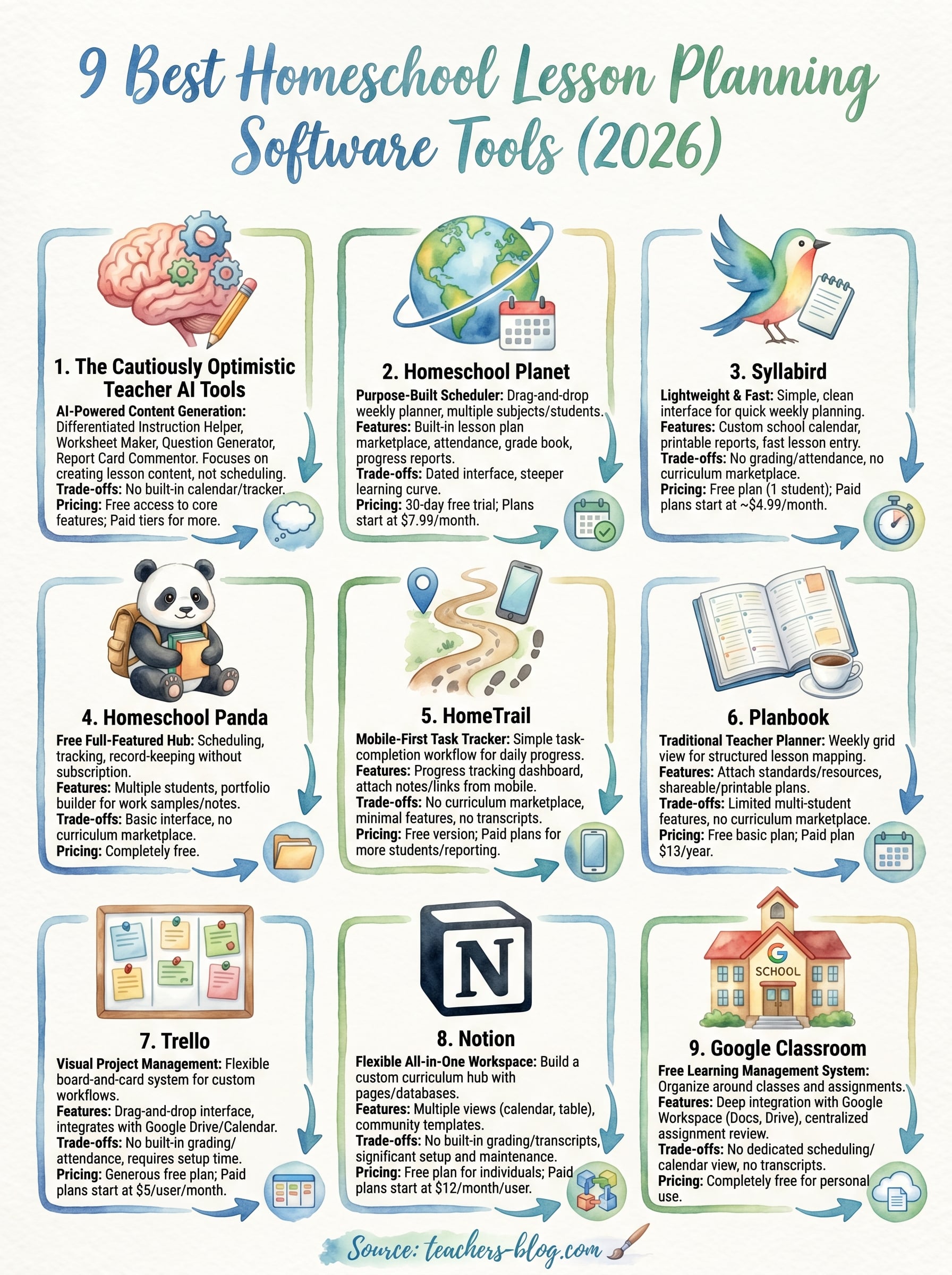
No single homeschool lesson planning software works for every family, so your best move is matching the tool to how you actually run your school day. If you want a dedicated scheduling system with built-in records and progress tracking, Homeschool Planet or Homeschool Panda give you that structure immediately. If you prefer flexible, customizable workspaces, Notion or Trello let you design something that fits exactly how you think and plan.
Your lesson content matters just as much as your calendar. The AI tools at The Cautiously Optimistic Teacher cut your prep time significantly, especially when you’re teaching multiple kids at different levels or need polished written feedback for portfolio documentation. Pick one tool from this list, run it for a full month, and adjust based on what is actually working for you. Starting simple and refining as you go beats spending weeks hunting for a perfect setup that does not exist.