5 Critical Thinking Question Generator Tools for Teachers
Coming up with questions that push students beyond surface-level recall takes real effort. You’ve read the text, you know the material, but generating that perfect question, the one that sparks genuine debate or forces students to defend a position, can eat up planning time you don’t have. That’s exactly where a critical thinking question generator comes in. These tools use AI to produce higher-order questions from any topic or passage, giving you a solid starting point for discussion, assessments, or Socratic seminars.
Here at The Cautiously Optimistic Teacher, we built our own Question Generator tool specifically because we kept running into this problem ourselves. But we also know one tool doesn’t fit every situation. Some generators handle literary analysis better, others excel at cross-curricular question design, and a few offer features we genuinely think are worth your attention.
So we tested and compared five critical thinking question generators that are actually useful for teachers. Below, you’ll find what each tool does well, where it falls short, and which one might be the right fit for your classroom. No fluff, just practical recommendations you can act on today.
1. The Cautiously Optimistic Teacher Question Generator
The Cautiously Optimistic Teacher Question Generator is a free AI-powered tool built specifically with classroom teachers in mind. You paste in any text or topic, and it produces a set of higher-order questions designed to push students beyond recall and into analysis, evaluation, and synthesis.

What It Generates and How It Works
You enter a passage, a topic, or even a single concept, and the tool generates a focused list of critical thinking questions aligned with deeper levels of cognition. It draws directly on the input you provide, so the questions stay relevant to your specific material rather than producing generic prompts you’d need to rewrite.
Best For
This tool works best for middle and high school teachers who need discussion questions, Socratic seminar prompts, or assessment starters tied directly to a text they’re teaching. If you work with literature, history, or any subject that involves close reading, you’ll find it especially practical.
Standout Features for Classroom Use
The generator focuses entirely on question quality over quantity, giving you sharp, focused prompts rather than a long list you need to filter through. It also requires no account setup, which means you can use it immediately without creating a profile or entering any payment details.
A tool that skips signup friction and gets straight to output saves you real time during a packed planning period.
Limitations to Know
The tool works best when you give it specific, detailed input. Vague or broad topics tend to produce wider questions that may need some editing before they’re ready for classroom use.
Pricing and Access
The Question Generator is completely free to access. You can use it directly through The Cautiously Optimistic Teacher website with no subscription or login required.
2. Wayground Quizizz AI Bloom’s Taxonomy Questions Generator
The Wayground Quizizz AI Bloom’s Taxonomy Questions Generator structures its output around Bloom’s Taxonomy levels, making it useful when you want questions that span from basic understanding all the way up to evaluation and creation.
What It Generates and How It Works
You enter a topic or paste text, and the tool produces questions organized by Bloom’s Taxonomy levels. This gives you a mix of recall, comprehension, analysis, and evaluation questions in a single output, which helps with building differentiated assessments or discussion sequences.
Best For
This critical thinking question generator works well for teachers who want pre-sorted question sets they can deploy across an entire unit without manually adjusting difficulty levels.
If you already design lessons around Bloom’s Taxonomy, this tool fits naturally into your existing planning workflow.
Standout Features for Classroom Use
The Bloom’s Taxonomy framework is built directly into the output, saving you the step of manually categorizing questions after generation.
Limitations to Know
Because the tool sits within Quizizz’s broader platform, the question format leans toward quiz-style prompts rather than open-ended discussion starters.
Pricing and Access
Quizizz offers a free basic tier with core features, and premium plans are available through a paid subscription.
3. Questgen AI Higher-Order Questions Generator
Questgen AI is a dedicated question generation platform that focuses specifically on producing higher-order thinking questions from text you paste directly into the tool. It’s built for educators and trainers who need more than simple recall prompts.

What It Generates and How It Works
You paste a passage into Questgen, and the tool returns open-ended, analytical questions drawn from the content. It uses natural language processing to identify key concepts and build questions around them rather than pulling generic prompts from a template.
Best For
This critical thinking question generator suits teachers who work with dense informational text, such as primary sources, scientific articles, or long-form passages that need careful unpacking in class.
Standout Features for Classroom Use
Questgen handles longer text inputs better than most comparable tools, which makes it useful when you’re working with full chapters or extended readings rather than short excerpts.
If your students regularly read complex source material, a tool that processes longer passages without losing question quality saves you significant editing time.
Limitations to Know
The interface feels more technical than teacher-friendly, and the output occasionally needs editing before it’s ready for direct classroom use.
Pricing and Access
Questgen offers a free plan with limited generations per month, and paid tiers unlock higher usage volumes.
4. OpenEducat AI Discussion Questions Generator
OpenEducat offers a focused AI discussion questions generator that turns your text or topic input into open-ended prompts designed to spark classroom conversation and deeper thinking.
What It Generates and How It Works
You paste a topic or short passage into OpenEducat, and it returns a set of discussion-style questions built around that content. The tool targets conversational, open-ended prompts rather than assessment-style questions, making it a reasonable fit for teachers who run structured class discussions.
Best For
This critical thinking question generator works well for teachers who need ready-to-use discussion prompts quickly and don’t require deep customization in their output.
If your primary need is generating quick conversation starters rather than layered analytical questions, this tool covers that ground efficiently.
Standout Features for Classroom Use
OpenEducat keeps its interface simple and fast, which reduces the time between entering your content and getting usable output into your hands.
Limitations to Know
The tool produces discussion-focused questions that lean toward lower-order thinking at times. You may need to manually adjust several prompts before they push students toward genuine analysis.
Pricing and Access
OpenEducat provides free access to its question generator with no login required for basic use.
5. IvyPanda Question Generator From Text
IvyPanda offers a straightforward question generator from text that produces study and discussion questions from any passage you paste into the tool. It sits within IvyPanda’s broader suite of free academic writing aids and targets students and educators equally.
What It Generates and How It Works
You paste your text into the input field, and the tool returns a set of questions built directly from the content. It functions as a basic critical thinking question generator, surfacing prompts tied to the key ideas in your passage without requiring any account setup.
Best For
This tool suits teachers who need quick comprehension and discussion questions for shorter texts or reading assignments without additional configuration.
If you want a no-setup option that works immediately from any browser, IvyPanda fits that specific use case well.
Standout Features for Classroom Use
IvyPanda keeps the process fast and frictionless, which helps when you need questions on short notice during a busy planning day.
Limitations to Know
The output skews toward surface-level comprehension questions more than genuine higher-order thinking prompts, so expect to rewrite or supplement several questions before using them in a Socratic seminar or analytical discussion.
Pricing and Access
IvyPanda’s question generator is completely free with no login required.
Quick Recap and Next Step
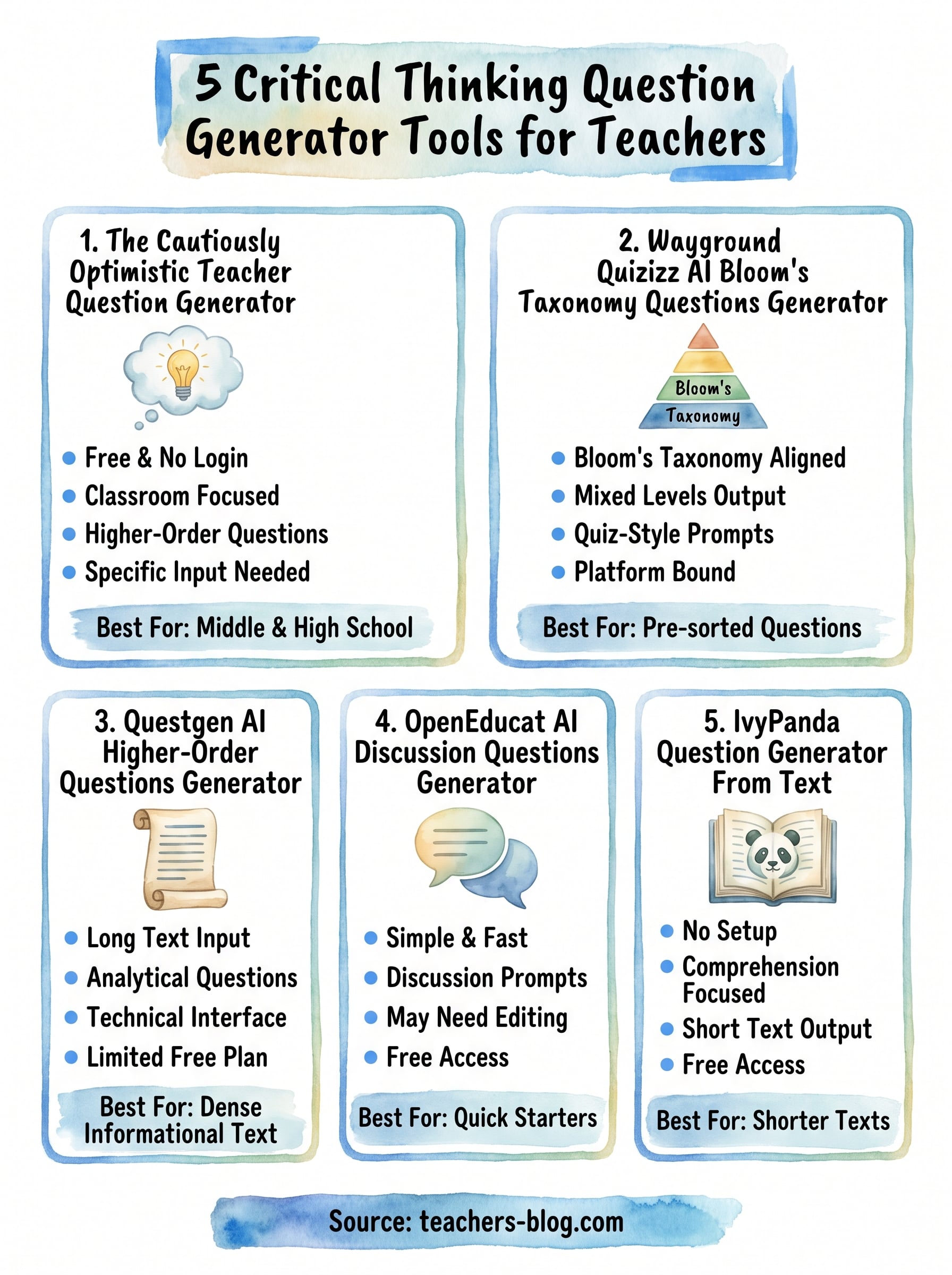
Each tool on this list solves a slightly different problem. Questgen and Quizizz work well if you need structured, taxonomy-aligned output. OpenEducat and IvyPanda are fast and free, but expect to edit before you use their questions in a serious discussion. If you want a critical thinking question generator built specifically for classroom teachers, with no login, no friction, and output focused on genuine higher-order thinking, the Cautiously Optimistic Teacher tool is the strongest starting point on this list.
Your planning time is limited, and these tools exist to protect it. Pick one that matches your current workflow rather than adding steps to it. If you teach middle or high school and regularly run discussions, seminars, or text-based assessments, start with the tool built for exactly that purpose. Head over to The Cautiously Optimistic Teacher and try the Question Generator on your next reading assignment today.