
AI Lesson Plan Creator Tools: 4 Platforms + Free Workflow
Which AI lesson plan creator is worth using for your classroom? This guide compares four platforms—MagicSchool, Canva, Eduaide, and Brisk Teaching—for objectives, standards alignment, editing, differentiation, and teacher control. It also includes a free prompt-and-template workflow for teachers who prefer not to adopt another platform.
The most useful AI creator is not necessarily the one that produces the longest plan. Look for editable steps, a realistic lesson sequence, practical accommodations, a clear assessment, and transparent free-versus-paid limits. Check every generated standard, text reference, and claim before teaching; AI drafts are starting points, not curriculum approval.
Related guides: Compare free AI lesson plan generators if price is your first priority, or follow our step-by-step AI lesson-planning workflow for example prompts. For planning foundations, use the Lesson Planning resource hub.
Bonus: Free Teacher-Designed AI Lesson Planning Workflow
Best for: educators who want full control over a lesson’s objectives, differentiation, and assessment without relying on a single proprietary lesson-plan creator. This is a prompt-and-template workflow, not a standalone automated generator.
How it works
Use our three-step guide to AI for lesson planning to define the lesson goal, draft and refine a prompt, and evaluate the result. Combine it with a blank lesson plan template so activities, assessment checks, and accommodations are visible in one place.
Strengths and limits
This approach makes it easy to bring your own subject expertise and adapt to classroom needs. It requires more teacher editing than a dedicated generator, and the cost or availability of the AI assistant you use depends on the provider. If you want to generate a draft directly in a dedicated tool, compare the four platforms below.
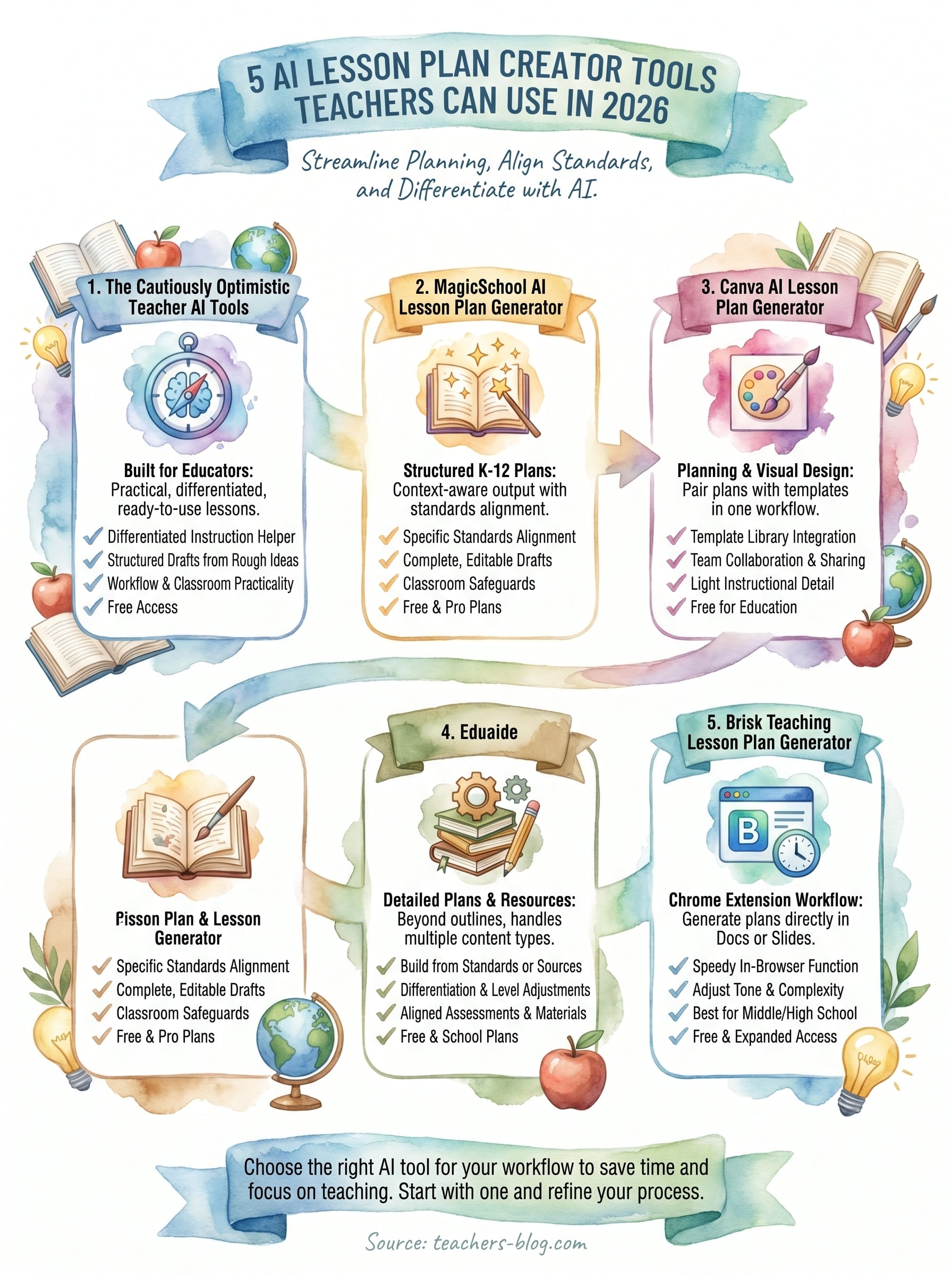
1. MagicSchool AI Lesson Plan Generator
MagicSchool has become one of the most widely used AI lesson-planning platforms in K-12 education. It generates structured lesson plans across subjects and grade levels with enough context awareness to make the output actually usable in a real classroom.
What it does for lesson planning
The lesson plan tool takes your grade level, subject, and learning objectives and returns a complete draft that includes an objective, materials list, instructional steps, and a closing activity.
Standards and objective alignment options
You can select specific standards, including Common Core and state-level options, and the tool ties the plan directly to those benchmarks. This saves you the step of manually mapping objectives after the fact.
Alignment built into the draft from the start means less editing before the plan is ready to use.
Customization and editing workflow
Once generated, every section is editable, so you can adjust pacing, swap activities, or rewrite instructions without starting over. The interface keeps your workflow clean and straightforward.
Classroom safeguards and teacher oversight
MagicSchool includes content filters designed for school environments, keeping generated output appropriate for students across grade levels. You stay in control as the teacher, reviewing and approving everything before it reaches your class.
Pricing
MagicSchool offers a free teacher plan with usage limits, a paid Plus plan for individuals, and an Enterprise plan for schools and districts. Verify features and limits before purchasing.
2. Canva AI Lesson Plan Generator
Canva is primarily known as a design tool, but its AI lesson plan creator feature has added real utility for teachers who want planning and visual design handled in the same place.
What it does for lesson planning
Canva’s AI generates a structured lesson outline based on your topic, grade level, and objectives. The output connects directly to its template library, so you can build slides, handouts, and worksheets alongside the plan without switching platforms.
Best ways to pair plans with lesson materials
The strongest use case is combining a generated lesson plan with Canva’s lesson plan templates and AI tools for student-facing materials. You move from plan to printed or digital resource in one workflow.
This makes Canva worth considering if you already use it for classroom visuals and want your planning in one place.
Collaboration and sharing for teams
Canva lets you share plans and materials with co-teachers or department teams directly inside the platform, which cuts down on file versions and back-and-forth emails.
Limitations to watch for in generated plans
The lesson output tends to stay light on instructional detail. You will need to add your own pacing and scaffolding before the plan is genuinely classroom-ready.
Pricing
Canva offers a free plan with basic AI features, and Canva for Education is free for eligible K-12 teachers and schools.
3. Eduaide
Eduaide is an AI-powered platform built specifically for educators, with a lesson plan generator that goes beyond simple outlines. It handles multiple resource types in one place, making it a practical option for teachers who want more than a bare-bones draft.
What it does for lesson planning
Eduaide generates detailed lesson plans that include objectives, instructional strategies, and activity steps. You provide your subject, grade level, and topic, and the tool returns a structured plan ready to edit immediately.
Building plans from standards, sources, or objectives
You can input a specific standard or learning objective to anchor the plan, which keeps the output focused rather than generic. Eduaide also lets you paste source material directly, so the plan builds around content you already use in class.
Starting from your own materials produces a plan that fits your classroom rather than a template requiring heavy editing.
Differentiation and level adjustments
Eduaide lets you adjust reading levels and complexity within the generated plan, which helps when you teach mixed-ability groups. You can produce tiered activity versions without writing separate plans from scratch.
Assessment and materials that connect to the plan
The platform generates aligned assessments and supporting resources alongside the lesson, giving you a more complete package than a typical standalone ai lesson plan creator. Exit tickets and rubric suggestions are available in the same workflow.
Pricing
Eduaide offers a free plan with generation limits and an individual Pro plan with expanded capabilities. School and district pricing is separate.
4. Brisk Teaching Lesson Plan Generator
Brisk Teaching is a Chrome extension that works directly inside the tools you already use, making it one of the more practical ai lesson plan creator options for teachers who spend their planning time in Google Docs or Slides.
What it does for lesson planning
The tool generates structured lesson plans from a topic, grade level, or standard you enter. It delivers a complete draft with objectives, activities, and timing built in, ready to edit immediately.
Speed and in-browser workflow for busy weeks
Because Brisk runs as a browser extension, you generate plans without opening a separate platform. This cuts the back-and-forth and keeps your planning workflow compact on days when time is short.
Working inside your existing documents means the output lands exactly where you need it, with no extra copy-pasting.
Quality controls to make plans more teachable
Brisk lets you adjust tone and complexity after generating, so you can tighten instructions or add scaffolding detail without rewriting the entire plan from scratch.
Best fits for grade levels and subjects
Teachers in middle and high school find Brisk especially useful for quick single-class lesson drafts across most K-12 subjects.
Pricing
Brisk Teaching offers a free plan for individual teachers, with a paid tier for expanded access and school teams.
How to Choose an AI Lesson Plan Creator
Try one lesson in two platforms before subscribing. Provide the same grade, subject, objective, lesson length, and assessment requirement; compare the plans for specificity, pacing, accessibility, and how easily you can edit them. Ask yourself which tool produces a useful first draft with the least correction.
MagicSchool and Eduaide offer teacher-focused creation environments with free and paid options; Canva suits teachers who also make student-facing visuals; and Brisk works alongside existing browser documents. For a no-platform-change alternative, use our AI lesson-planning prompt workflow. If price is the deciding factor, see the separate free lesson plan generators guide.
AI Lesson Plan Creator FAQs
What is the difference between an AI lesson plan creator and a free generator?
Both produce lesson drafts. A full creator platform may offer richer editing, document integration, assessment generation, and school-level features, sometimes on a paid plan. A free generator usually emphasizes rapid first drafts with fewer customization options.
Will AI create a ready-to-teach lesson automatically?
Not reliably. Check the curriculum standard, facts and references, time allocation, differentiation, and evidence of learning. Treat generated content as a draft requiring professional review.
Which features are worth paying for?
Consider a paid plan only if the features you use repeatedly—such as expanded generation limits, better revision controls, export options, or district-approved integrations—save you measurable time. Check provider terms and school policies first.