
11 Unit Planning Templates for Teachers: Word + Google Docs
A strong unit plan keeps your teaching focused, your lessons connected, and your students moving toward clear goals. But building one from scratch every time? That eats hours you don’t have. That’s exactly why unit planning templates for teachers exist, they give you a proven structure so you can spend less time formatting and more time on the work that actually matters: designing meaningful learning experiences.
Here at The Cautiously Optimistic Teacher, we create resources that help educators work smarter, whether that’s through our differentiated unit plans for literature and writing or our AI-powered classroom tools. We know firsthand how much a solid template can speed up the planning process, so we pulled together 11 of the best unit planning templates available in Word and Google Docs formats.
Each template below is downloadable, editable, and ready to fit your curriculum. Whether you need something simple and clean or a detailed backward-design framework, you’ll find an option that matches your planning style. Let’s get into the list so you can pick the right template and start building.
1. UDL-first unit planning template
The Universal Design for Learning (UDL) framework asks you to plan for every learner from the start, not retrofit accommodations after the fact. A UDL-first unit planning template builds that flexibility directly into the structure, so your planning process reflects the diverse needs of your actual students rather than a hypothetical average learner who probably doesn’t exist in your classroom.
What this template solves
Most generic unit plans assume one type of learner. You fill in the objectives, add some activities, and move on. The problem is that approach leaves students with different learning profiles either struggling to keep up or checking out because the material never quite reaches them. A UDL-first template fixes this by prompting you to build multiple means of engagement, representation, and action and expression into every unit right from the beginning, before you ever step into the classroom.
Planning for variability upfront consistently takes less time than modifying individual lessons for students after the unit is already underway.
Fields to include
A solid UDL unit planning template should include the following fields:
- Unit title, subject, and grade level
- Enduring understandings and essential questions
- Learning objectives written with flexible means in mind
- Multiple means of engagement: choice boards, student interest options, and collaboration structures
- Multiple means of representation: visual supports, text alternatives, and multimedia options
- Multiple means of action and expression: written, verbal, and creative output options
- Scaffolds and structured supports for students who need additional guidance
- Extensions for students ready to go further
- Assessment options that allow students to demonstrate mastery in different ways
How to use it in Word and Google Docs
In Google Docs, duplicate the template at the start of each new unit and fill it in collaboratively with co-teachers or instructional coaches in real time. The comment and suggestion features let you flag areas where your UDL strategies need strengthening before teaching begins. In Word, save a master copy and use "Save As" each time so your original template stays clean and reusable. Whichever format you choose, revisit the template mid-unit to check whether the supports you planned are actually reaching your students.
2. Understanding by Design backward design template
The Understanding by Design (UbD) framework, developed by Grant Wiggins and Jay McTighe, flips the planning sequence. Instead of starting with activities, you start with the end: what you want students to understand and be able to do by the time the unit is over. This template makes that backward-design thinking concrete and repeatable.
What this template solves
Many teachers plan forward, picking engaging activities first and then attaching standards to them later. That approach often produces lessons that feel fun but lack clear learning targets. A UbD backward design template forces you to identify your desired results before you choose a single activity, which means every lesson you build actually serves your end goals rather than just filling time.
When your assessments are designed before your instruction, you teach toward something measurable rather than hoping the learning sticks.
Fields to include
A strong UbD template covers all three stages of the framework:
- Stage 1 – Desired Results: standards, enduring understandings, essential questions, knowledge, and skills
- Stage 2 – Evidence: summative and formative assessment tasks and success criteria
- Stage 3 – Learning Plan: instructional sequence, key activities, and resources
How to use it in Word and Google Docs
In Google Docs, use the three-stage structure as separate sections with clear headers so your planning team can work through each stage together. In Word, format each stage as its own table to keep the connections between standards, assessments, and instruction visible at a glance.
3. Standards-to-skills alignment matrix template
A standards-to-skills alignment matrix template takes your required standards and maps them directly to the specific skills students need to demonstrate mastery. Instead of treating standards as abstract checkboxes, this template makes the connection between what you’re required to teach and what students actually practice visible and trackable across your entire unit.
What this template solves
When you plan a unit without a clear alignment map, it’s easy to spend most of your time on skills that are loosely connected to your standards while neglecting the ones that carry the most instructional weight. This template keeps you honest by forcing you to see exactly which standards are well-covered and which have gaps before you finalize your unit sequence.
A clear alignment matrix is one of the most useful unit planning templates for teachers because it prevents the common mistake of over-teaching some skills while under-teaching others.
Fields to include
Your matrix works best when it captures both the standards and the specific skills tied to each one. Build it with these fields so every column and row tells you something actionable about your coverage:
- Standard code and full text on one axis
- Specific skills and learning targets on the other axis
- Lesson or activity tied to each intersection point
- Depth of knowledge (DOK) level for each skill
- Assessment type used to measure mastery
How to use it in Word and Google Docs
In Google Sheets (linked from Google Docs), build the matrix as a grid so you can color-code cells to spot coverage gaps instantly. In Word, insert a table and fill in each row as you finalize your lesson sequence, then refer back to it whenever you add or cut activities.
4. Unit calendar pacing guide template
A unit calendar pacing guide template gives you a bird’s-eye view of your entire unit across the days or weeks you have to teach it. Instead of guessing whether your lessons will fit your instructional window, you see the full sequence mapped out before you start teaching.
What this template solves
Running out of time before reaching your most important content is one of the most common planning problems teachers face. A pacing guide template forces you to distribute your instructional time deliberately across objectives, so you’re not cramming key content into the final week. This is one of the most practical unit planning templates for teachers because it connects your goals to your actual school calendar rather than an ideal one.
When you plan your pacing before you start teaching, you catch scheduling conflicts early instead of scrambling to fix them mid-unit.
Fields to include
Build your pacing guide with these fields so it stays actionable and easy to follow throughout the unit:
- Week-by-week or day-by-day date range
- Standards and learning objectives covered each day
- Key instructional activities and texts per block
- Formative checkpoints and summative assessment dates
- School events, holidays, and built-in flex days
How to use it in Word and Google Docs
In Google Docs, set up a table with one column per week and link it to your lesson plans so updates carry through automatically. The comment feature lets you flag pacing concerns with a co-teacher or department head without altering the main document.
For Word, use a calendar-style table and highlight flex days in a distinct color so you can always see where you have room to slow down or accelerate based on how your students are progressing.
5. Daily lesson sequence and routines template
A daily lesson sequence and routines template breaks your unit down into the specific instructional moves you make every single class period. Instead of leaving daily structure up to chance, this template gives you a repeatable framework for how each lesson opens, builds, and closes, so your students always know what to expect and your pacing stays on track.
What this template solves
Planning a unit without a daily structure can leave your lessons feeling disconnected from one another, even when your content is solid. This template solves that by mapping out the instructional routine for each class period within your unit, making it easier to spot where transitions are weak or where you’ve packed too much into a single day.
Consistent daily routines lower the cognitive load on students, which means more of their attention goes toward the actual learning rather than figuring out what comes next.
Fields to include
- Opening routine: bell ringer, warm-up, or retrieval practice
- Learning objectives for the day
- Direct instruction block with time estimate
- Guided and independent practice activities
- Closing routine: exit ticket, reflection, or wrap-up
How to use it in Word and Google Docs
In Google Docs, duplicate one completed day as your base and adjust it for each new lesson rather than starting from scratch. This keeps your daily structure consistent across all unit planning templates for teachers in your department. In Word, use a table with one row per lesson phase so the sequence stays clear at a glance.
6. Formative assessment tracker template
A formative assessment tracker template gives you a running record of student progress throughout your unit, not just a snapshot at the end. Instead of relying on memory or scattered notes, you have one organized document that shows where each student stands at every checkpoint along the way.
What this template solves
Without a tracker, formative data often gets lost between lessons. You collect an exit ticket, note a few names, and then move on without a clear picture of who needs reteaching and who is ready to advance. This template keeps that data in one place so you can make informed instructional decisions before you reach your summative assessment.
Catching gaps early through consistent formative tracking means fewer students fall behind without you noticing.
Fields to include
Build your tracker with these fields to stay on top of student progress across every checkpoint in your unit:
- Student names listed by row
- Assessment type and date per column
- Proficiency level or score for each data point
- Notes column for anecdotal observations
- Action column indicating next instructional steps
How to use it in Word and Google Docs
In Google Sheets (linked from Google Docs), use conditional formatting to color-code proficiency levels so patterns jump out immediately. This makes your formative tracker one of the most visually useful unit planning templates for teachers managing large class rosters. In Word, build a simple table and update it after each checkpoint so your data stays current and ready to shape your next lesson.
7. Summative assessment and rubric template
A summative assessment and rubric template ties your end-of-unit evaluation directly to the learning objectives you set at the start of your unit. When your rubric is built before instruction begins, every lesson you teach points toward the same clear standard of mastery.
What this template solves
Without a rubric designed in advance, grading summative work becomes inconsistent and time-consuming. This template solves that by giving you a criteria-based scoring guide that aligns with your standards, so your feedback is specific and your grades are defensible to students, parents, and administrators alike.
Sharing your rubric with students before they begin a summative task consistently improves the quality of their work.
Fields to include
Build your summative template with these fields to keep assessment and instruction aligned across your full unit:
- Assessment title, type, and unit connection
- Standards and learning objectives being assessed
- Criteria listed in rows with clear descriptors
- Performance levels across columns (for example: exceeds, meets, approaching, beginning)
- Point values per criterion and total score
- Space for written teacher feedback
How to use it in Word and Google Docs
In Google Docs, share the rubric directly with students through Google Classroom before they start working so expectations are transparent from day one. In Word, save a blank master and create a new copy for each class section so your original formatting stays intact. Either format makes this one of the most reusable unit planning templates for teachers who assess the same skills across multiple classes or course sections.
8. Vocabulary and concept map template
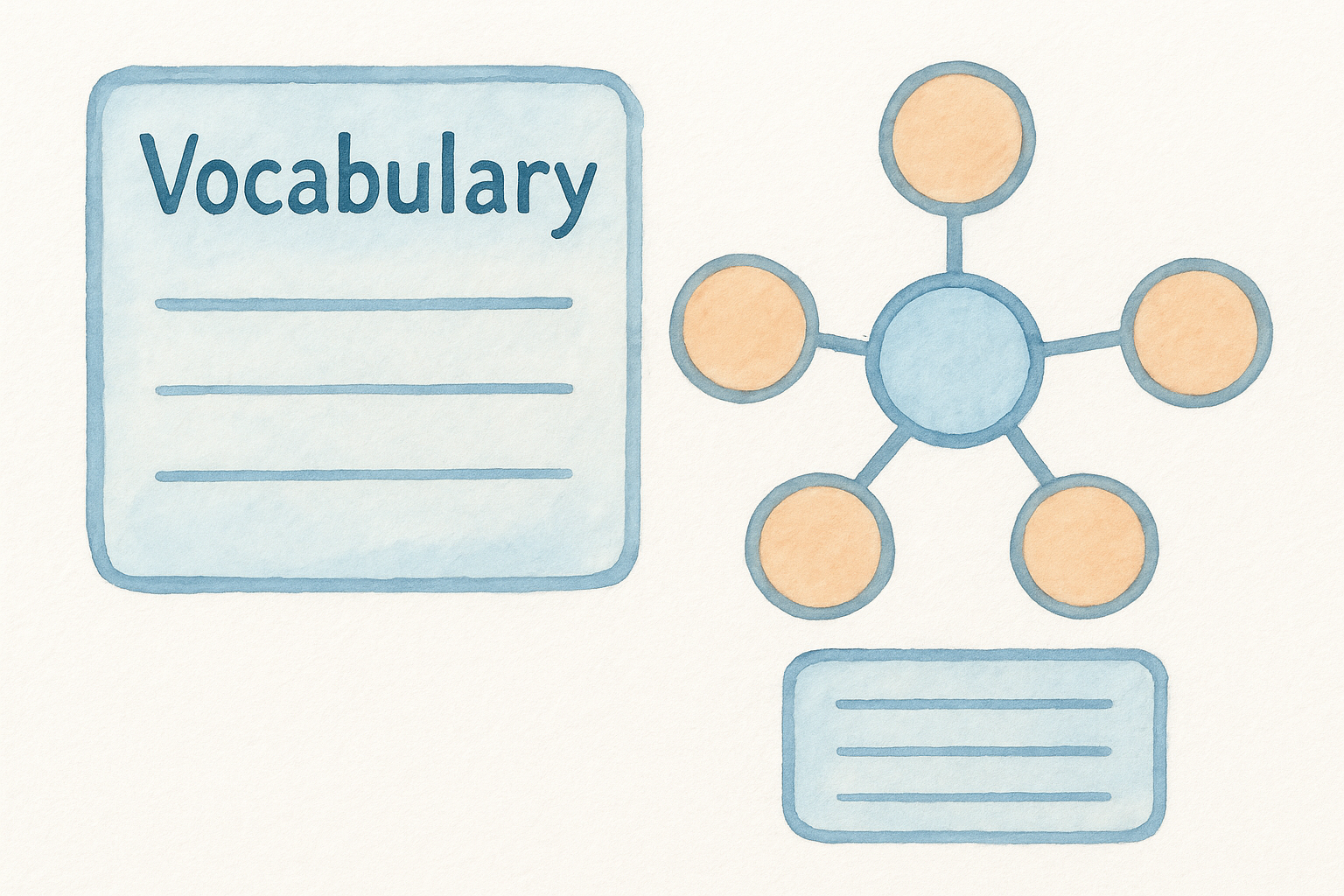
A vocabulary and concept map template connects the key terms of your unit to the broader ideas they support, giving students a visual anchor for the language they need to access your content. Instead of teaching vocabulary in isolation, this template helps you plan how new terms build on each other throughout the unit so students develop conceptual understanding alongside word-level knowledge.
What this template solves
Units that introduce vocabulary without connecting it to core concepts leave students memorizing definitions they can’t actually use. This template solves that by prompting you to map how terms relate to your essential questions and to each other, so your vocabulary instruction reinforces comprehension rather than running parallel to it.
When students see how vocabulary fits into the larger concept structure of a unit, retention improves significantly compared to standalone word lists.
Fields to include
- Core vocabulary terms tied to unit standards
- Definitions in student-friendly language
- Related concepts and essential question connections
- Space for student examples and non-examples
- Visual concept map diagram or web structure
How to use it in Word and Google Docs
In Google Docs, use the drawing tool to build a live concept map that you update as the unit progresses, adding terms and connections as students encounter them. This makes it one of the most dynamic unit planning templates for teachers who teach concept-heavy content. In Word, insert a SmartArt diagram to create a clean visual map you can print and post in your classroom as a reference anchor.
9. Differentiation and accommodations template
A differentiation and accommodations template documents the specific adjustments you make for individual learners so those modifications are built into your unit from the start rather than added as an afterthought. Unlike generic planning documents, this template keeps student-specific needs visible throughout your unit so nothing slips through the cracks.
What this template solves
When accommodations live only in an IEP binder or a teacher’s memory, they rarely make it into daily lesson execution consistently. This template solves that by giving you one centralized place to record which students need what supports, so every lesson you plan accounts for the full range of learners in your room before you write a single objective.
Documenting accommodations inside your unit plan means substitutes and co-teachers can deliver consistent support without needing to track down separate paperwork.
Fields to include
Build your differentiation template to capture both the accommodation type and the instructional context where it applies, so you can reference it quickly during planning rather than searching through separate documents. Include these fields to keep student support information organized and accessible:
- Student identifiers (initials or codes to protect privacy)
- Accommodation type: extended time, preferential seating, modified text
- IEP or 504 goal connected to the unit
- Instructional adjustments per lesson phase
- Notes on progress toward accommodation goals
How to use it in Word and Google Docs
In Google Docs, restrict editing access so only authorized team members can view student-specific fields, keeping this among the more sensitive unit planning templates for teachers to manage digitally. In Word, save it as a password-protected file and share printed copies only with staff who work directly with those students.
10. Materials, links, and copies tracker template
A materials, links, and copies tracker template keeps every resource your unit requires organized in one place, so you’re not digging through bookmarks and folder structures the night before a lesson. This template connects your physical and digital materials directly to the lessons that need them, eliminating the last-minute scramble that derails even well-planned units.
What this template solves
Without a centralized tracker, materials management becomes a daily time drain. You know you saved that article somewhere, the handout exists in some folder, and you think you made enough copies last semester. This template solves that by giving you a single reference point for every resource tied to your unit, so every lesson runs smoothly from day one rather than after you’ve already lost preparation time.
A well-built materials tracker is one of the most underrated unit planning templates for teachers because it removes friction from execution, not just from planning.
Fields to include
- Lesson day or date the resource is needed
- Resource title and type (handout, video, article, manipulative)
- Link or file location for digital resources
- Copies needed and copies made status
- Notes on where physical materials are stored
How to use it in Word and Google Docs
In Google Docs, hyperlink each digital resource directly in the tracker so you can open materials with one click on the day you teach. In Word, maintain a printed version alongside your physical materials so your prep is fully self-contained and accessible even without internet access.
11. Unit reflection and revision template
A unit reflection and revision template turns your post-unit debrief into structured, actionable data rather than a vague sense of what worked and what didn’t. This template captures your honest observations about pacing, engagement, and assessment results so your next iteration of the unit is stronger before you start planning again.
What this template solves
Without a formal reflection process, your best insights about a unit fade quickly once the next one begins. This template solves that by giving you a dedicated space to record what you observed while the unit is still fresh, so you can make concrete revisions based on evidence rather than guessing what to change the following year.
The teachers who improve their units fastest are the ones who build reflection into their planning cycle rather than treating it as optional.
Fields to include
- What worked well: specific lessons, activities, or structures worth keeping
- What needs revision and why
- Student performance patterns on formative and summative assessments
- Pacing notes: too fast, too slow, or well-calibrated
- Resources to add, cut, or replace before the next run
How to use it in Word and Google Docs
In Google Docs, complete this template within the same shared unit folder so your reflection stays connected to the rest of your unit planning templates for teachers on the team. Your Word version works best when attached as the final page of your unit document so your revision notes travel with the plan and are ready the next time you open it.
Wrap-up and next steps
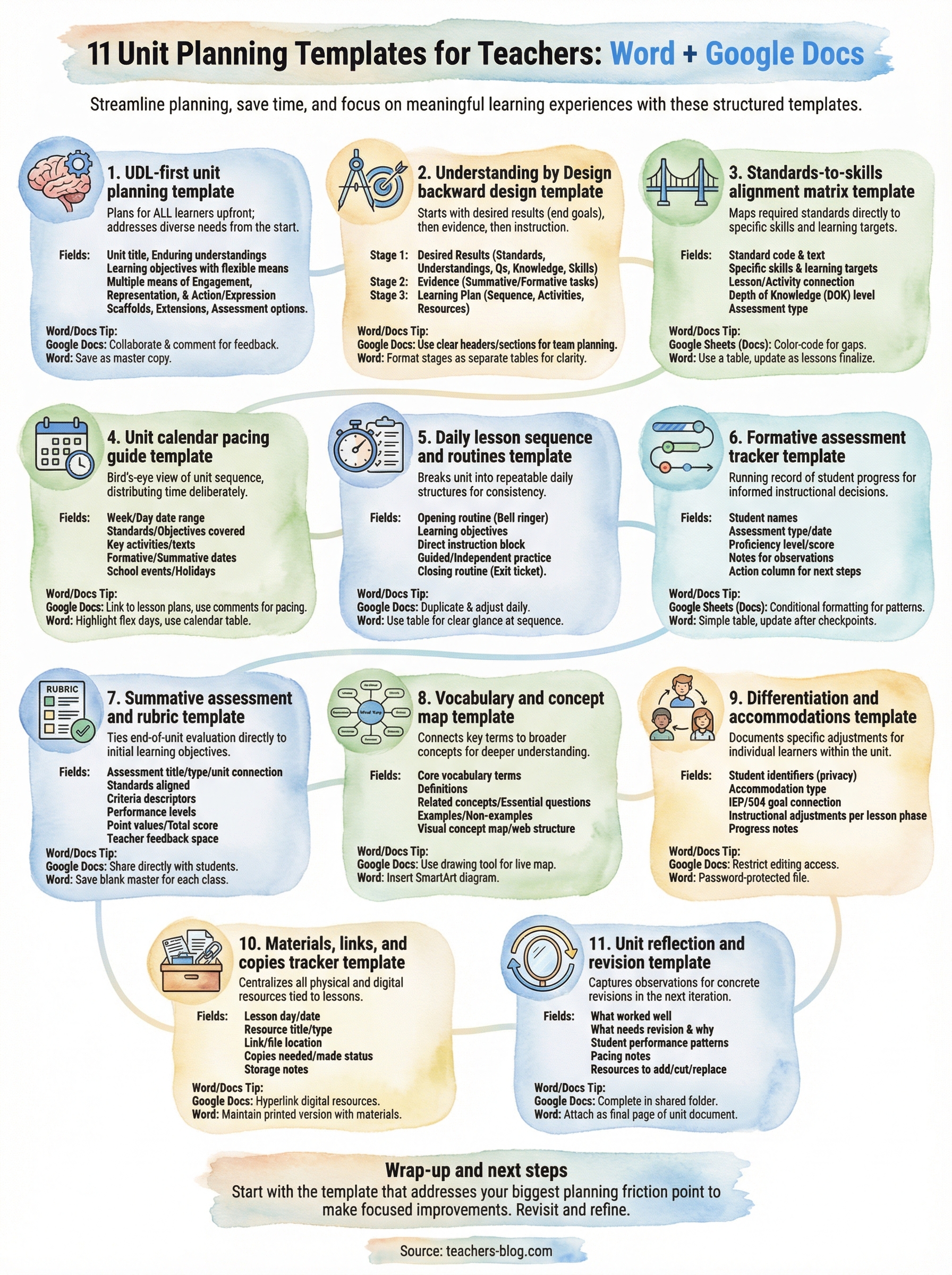
These 11 unit planning templates for teachers cover every stage of the planning cycle, from setting your first learning objectives to reflecting on what to change before the next run. Each template solves a specific planning problem, so you can pick the ones that match your current gaps rather than overhauling your entire process at once.
Start with the template that addresses your biggest friction point right now. If pacing is where you lose time, open the calendar guide first. If your differentiation feels inconsistent across lessons, begin there instead. Small, focused improvements compound quickly when you apply them across a full unit.
For even more ready-to-use resources, explore The Cautiously Optimistic Teacher, where you’ll find differentiated unit plans, AI-powered classroom tools, and practical teaching strategies built to help you spend less time on logistics and more time on the instruction that actually moves your students forward.